









Smart Central Control Panels · Orvibo
MixPad M5
All prices in AED. Free delivery over AED 250.00.
- UAE delivery1–3 working days
- WarrantyBrand warranty, ask us for terms
- InstallationAvailable in Dubai
- 14-day returnsUnused, in original packaging
Overview
1Product Overview
| Attribute | Details |
|---|---|
| Product Name | MixPad M5 Smart Voice Control Panel |
| Product Category | Smart Home Control Panel |
| Product Type | Smart voice and touch control panel |
| Main Function | Central control for lighting, curtains, air conditioning, scenes, automation and other compatible smart devices |
| Lighting Control | Built-in 4-gang lighting control |
| Touch Control | Touch dimming and brightness/color adjustment |
| Voice Control | Built-in Alexa voice assistant |
| App Control | Remote control through the compatible smart home app |
| Communication | Wi-Fi 2.4 GHz / 5 GHz, Bluetooth and Zigbee |
| Mounting | Surface mount |
| Material | Plastic |
| Power Supply | 220–240V AC, 50/60Hz |
| Operating Temperature | 0°C to 45°C / 32°F to 113°F |
| Operating Humidity | ≤90% RH |
2Main Features
| Feature | Details |
|---|---|
| All-in-One Control | Combines multiple smart home controls in one wall-mounted panel. |
| 4-Gang Lighting Control | Built-in control for four lighting gangs. |
| Touch Dimming | Adjust light brightness through the touch interface. |
| Color Adjustment | Compatible smart lighting can be adjusted for brightness and color where supported. |
| Light Scenes | Supports preset lighting scenes for different activities and moods. |
| Light Groups | Compatible lights can be grouped for easier control. |
| Voice Assistant | Alexa voice assistant is built into the panel. |
| Voice Commands | Control compatible smart home functions using voice commands. |
| Automation | Supports timing, automation and scene-based control. |
| Remote App Control | Compatible devices can be managed remotely through the app. |
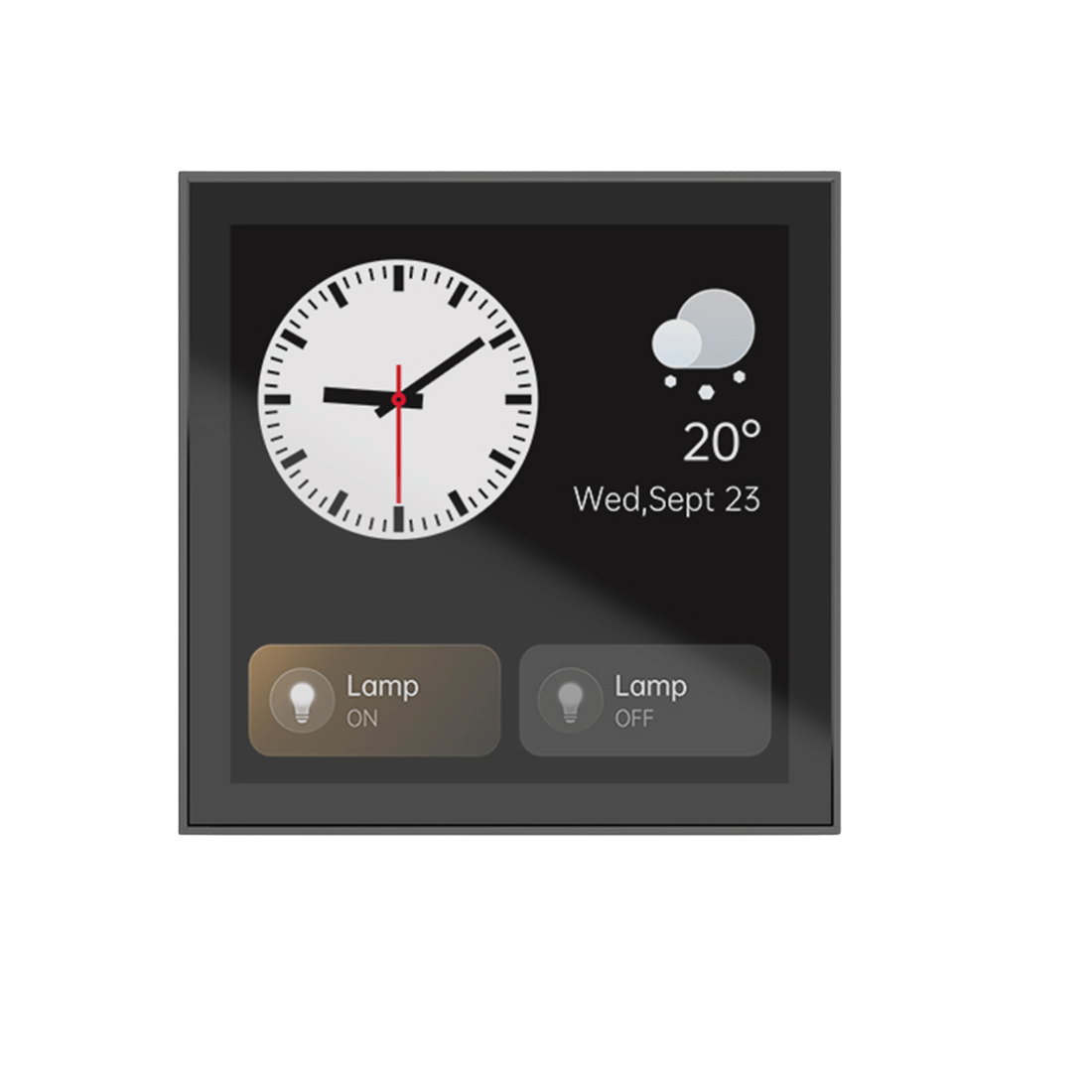
| Weather Information | Provides weather forecast information on the panel. |
| Alarm Function | Alarm settings are supported. |
| Device Control | Can be used to control compatible lights, curtains, air conditioners and more. |
3Display & Touch Interface
| Specification | Details |
|---|---|
| Display Size | 4-inch touch display |
| Display Resolution | 480 × 480 pixels |
| Display Type | Color touch display |
| Touch Control | Capacitive multi-touch interface |
| Brightness Control | Touch-based lighting adjustment |
| Color Control | Compatible smart lighting color adjustment |
| Interface | Designed for quick access to smart home functions |
| Use | Lighting, scenes, automation, climate and other supported device controls |
4Lighting Control
| Lighting Feature | Details |
|---|---|
| Lighting Channels | 4-gang built-in lighting control |
| L1 / L2 Load | Maximum 400W per gang |
| L3 / L4 Load | Maximum 200W per gang |
| Supported Load Types | LED, CFL, incandescent and other compatible lighting loads |
| Touch Dimming | Supported |
| Brightness Adjustment | Supported |
| Color Adjustment | Supported for compatible color-capable lighting |
| Light Scenes | Supported |
| Light Groups | Supported |
| Voice Lighting Control | Supported through Alexa voice control |
5Voice Control
| Feature | Details |
|---|---|
| Voice Assistant | Built-in Alexa voice assistant |
| Hands-Free Control | Control compatible smart home functions using voice commands. |
| Lighting | Voice control of compatible lights |
| Scenes | Activate compatible smart home scenes by voice |
| Climate | Voice control can be used for compatible air-conditioning functions |
| Curtains | Control compatible smart curtain devices |
| Smart Devices | Control compatible devices connected to the smart home ecosystem |
| Family Use | Voice and touch operation provides an alternative to app-based control. |
6Smart Home Device Control
| Device / Function | Control Capability |
|---|---|
| Lights | On/off, dimming, brightness, color and scene control where supported |
| Lighting Groups | Control multiple compatible lights together |
| Curtains | Open, close and automate compatible curtain devices |
| Air Conditioning | Control compatible smart HVAC devices |
| Scenes | Run preset or customized smart home scenes |
| Automation | Create timing and automation routines |
| Weather | View weather forecast information |
| Alarm | Set and manage alarms |
| Other Devices | Control compatible devices connected through supported communication protocols |
7Connectivity & Communication
| Protocol | Details |
|---|---|
| Wi-Fi | 2.4 GHz and 5 GHz |
| Bluetooth | Built-in Bluetooth connectivity |
| Zigbee | Built-in Zigbee communication |
| Wi-Fi Use | Network connection and smart home communication |
| Bluetooth Use | Compatible local smart device communication |
| Zigbee Use | Connection with compatible Zigbee smart home devices |
| Multi-Protocol Design | Allows different compatible smart home technologies to work through one control interface. |
8Hardware Specifications
| Specification | Details |
|---|---|
| Processor | RK3326-S |
| CPU Architecture | Quad-core processor platform |
| RAM | 2GB |
| Storage | 8GB |
| Display | 4-inch, 480 × 480 pixels |
| Microphone | Linear dual-microphone array |
| Speaker | 1W × 1 |
| Touch | Capacitive touch interface |
9Electrical Specifications
| Specification | Details |
|---|---|
| Input Voltage | 220–240V AC |
| Frequency | 50/60Hz |
| Power Type | AC mains powered |
| Lighting Load Type | LED, CFL, incandescent and compatible loads |
| L1 Load | Maximum 400W |
| L2 Load | Maximum 400W |
| L3 Load | Maximum 200W |
| L4 Load | Maximum 200W |
| Maximum Combined Lighting Load | Up to 800W based on the individual gang limits |
| Installation Type | Wall-mounted electrical installation |
10Dimensions & Physical Details
| Specification | Details |
|---|---|
| Product Dimensions | 3.39 × 3.39 × 1.51 inches |
| Approx. Metric Size | 86.1 × 86.1 × 38.4 mm |
| Material | Plastic |
| Form Factor | Compact wall-mounted control panel |
| Mounting Type | Surface mount |
| Design | Designed for integration with modern wall interiors |
| Installation Location | Indoor wall installation |
11Mounting & Installation
| Installation Detail | Information |
|---|---|
| Mounting Type | Surface mount |
| Installation Position | Wall-mounted |
| Electrical Connection | 220–240V AC, 50/60Hz |
| Lighting Wiring | Up to four lighting gangs can be connected within the specified load limits. |
| Network Setup | Connect the panel to a compatible Wi-Fi network during smart home setup. |
| Device Pairing | Compatible Bluetooth and Zigbee devices can be connected through the supported ecosystem. |
| Installation Skill | Electrical installation should be completed by a qualified professional. |
12Installation Guide
- Check the electrical supply: Confirm that the installation location has a suitable 220–240V AC supply at 50/60Hz.
- Switch off power: Turn off the relevant circuit breaker before handling the wall wiring.
- Prepare the mounting location: Confirm there is enough space for the panel and its electrical connections.
- Check the lighting circuits: Identify the circuits that will be connected to the four lighting channels.
- Confirm load ratings: Keep each connected lighting load within the specified 400W L1/L2 and 200W L3/L4 limits.
- Connect the wiring: Follow the product installation instructions and local electrical requirements when connecting the panel.
- Secure the panel: Mount the MixPad M5 securely on the prepared wall surface.
- Restore power: Turn the circuit breaker back on after checking all connections.
- Start the panel: Allow the MixPad M5 to complete its startup process.
- Connect Wi-Fi: Connect the panel to the available 2.4GHz or 5GHz Wi-Fi network.
- Set up the smart home app: Add the panel to the compatible smart home ecosystem.
- Pair devices: Connect compatible Zigbee, Bluetooth and Wi-Fi devices.
- Configure lighting: Assign and name the connected lighting channels.
- Create scenes: Set up scenes for routines such as morning, evening or movie time.
- Configure automation: Add schedules and automated actions according to your requirements.
- Set up voice control: Configure Alexa and test supported voice commands.
- Test each channel: Check every connected lighting circuit individually.
- Test remote control: Confirm that compatible devices respond through the app.
13Operating Environment
| Condition | Specification |
|---|---|
| Operating Temperature | 0°C to 45°C / 32°F to 113°F |
| Operating Humidity | ≤90% RH |
| Installation Environment | Indoor environment |
| Humidity Protection | Designed for environments within the specified humidity range |
| Outdoor Installation | Not intended as an outdoor control panel |
| Heat Exposure | Avoid installation near direct heat sources or locations outside the specified temperature range |
| Water Exposure | Keep away from direct water exposure and unsuitable wet locations |
14Scenes & Automation
| Function | Details |
|---|---|
| Scene Control | Activate multiple smart home actions together. |
| Lighting Scenes | Set a preferred combination of brightness, color and lighting groups. |
| Timing | Schedule compatible smart home actions. |
| Automation | Use configured conditions and actions to automate supported devices. |
| Morning Routine | Can be configured as a multi-device scene according to the installed system. |
| Movie Scene | Can combine compatible lighting, curtains and other devices into one command. |
| Night Scene | Can be configured to reduce lighting and activate other compatible devices. |
| Remote Scene Control | Compatible scenes can be managed through the smart home app. |
15App & Remote Control
| Function | Details |
|---|---|
| Remote Control | Manage compatible smart home devices through the mobile app. |
| Device Status | Check supported device status remotely. |
| Lighting | Control compatible lights and lighting groups. |
| Scenes | Create and activate supported scenes. |
| Automation | Configure schedules and automated routines. |
| Device Management | Manage compatible connected smart home devices from one ecosystem. |
| Mobile Platform | Compatible smart home app support for mobile devices. |
16Alexa Integration
| Function | Details |
|---|---|
| Alexa | Built-in Alexa voice assistant |
| Voice Lighting Control | Control compatible lighting using voice commands |
| Smart Scenes | Activate supported scenes using voice |
| Climate Control | Voice control of compatible air-conditioning devices |
| Curtain Control | Voice control of compatible curtain systems |
| Hands-Free Operation | Useful when physical touch control is inconvenient |
17Smart Device Ecosystem
| Area | Details |
|---|---|
| Wi-Fi Devices | Compatible Wi-Fi smart devices can be managed through the supported ecosystem. |
| Zigbee Devices | Compatible Zigbee devices can connect through Zigbee communication. |
| Bluetooth Devices | Compatible Bluetooth devices can communicate with the panel. |
| Lighting | Smart lighting, groups and scenes |
| Shading | Compatible curtains and shading devices |
| HVAC | Compatible air-conditioning and climate-control devices |
| Automation | Multiple compatible devices can participate in automated routines. |
| Device Management | Designed as a central interface rather than requiring a separate wall control for every function. |
18Smart Assistant Functions
| Function | Details |
|---|---|
| Weather Forecast | View current weather forecast information. |
| Alarm | Set alarms for reminders and daily routines. |
| Voice Assistance | Use built-in Alexa voice interaction. |
| Device Control | Control supported lighting, curtains, air conditioning and other smart devices. |
| Automation | Run scheduled and event-based smart home actions. |
| Scene Control | Activate several compatible actions from one command. |
19Recommended Applications
| Application | How MixPad M5 Can Be Used |
|---|---|
| Living Room | Control lights, scenes, curtains and compatible climate devices from one location. |
| Bedroom | Use lighting scenes, timing and voice commands for daily routines. |
| Kitchen | Control lighting and compatible smart devices without reaching for a phone. |
| Home Office | Create work lighting scenes and automate compatible devices. |
| Entrance | Provide convenient central control for selected home functions. |
| Villa | Use the panel as part of a wider multi-device smart home installation. |
| Apartment | Centralize commonly used lighting and smart home controls. |
| Hospitality | Can be integrated into suitable smart-room control systems. |
| Smart Home Projects | Suitable for installations requiring touch, voice, app and multi-protocol control. |
20Installation Considerations for Dubai & UAE
| Consideration | Recommendation |
|---|---|
| Power Supply | Confirm the installation provides 220–240V AC at 50/60Hz. |
| Electrical Installation | Use a qualified electrician for mains wiring and load connections. |
| Indoor Location | Install in a suitable indoor location away from direct water exposure. |
| Temperature | Keep the indoor environment within the specified 0°C to 45°C operating range. |
| Humidity | Keep the environment within the specified ≤90% RH limit. |
| Wi-Fi Coverage | Check 2.4GHz and 5GHz Wi-Fi signal strength at the planned installation point. |
| Lighting Loads | Check each connected lighting circuit against the specified gang limits. |
| Smart Home Planning | Confirm that the required lights, curtains, HVAC equipment and other devices use supported protocols. |
| Professional Setup | Recommended for villas, apartments and larger automation projects where multiple systems need integration. |
21Why Choose MixPad M5
| Benefit | What It Offers |
|---|---|
| Centralized Control | Brings multiple smart home functions into one wall panel. |
| Touch + Voice | Use the screen or voice commands depending on the situation. |
| 4-Gang Lighting | Provides built-in control for four lighting circuits. |
| Multi-Protocol | Supports Wi-Fi, Bluetooth and Zigbee communication. |
| Alexa Built-In | Provides hands-free voice interaction. |
| Remote App | Compatible smart devices can be managed remotely. |
| Automation | Supports timing, automation and scene-based routines. |
| Compact Design | Uses a compact wall-mounted form factor. |
| Daily Convenience | Frequently used functions can be accessed without opening separate apps. |
22What's in the Box
| Item | Details |
|---|---|
| MixPad M5 Control Panel | 1 × MixPad M5 Smart Voice Control Panel |
| Mounting Components | Mounting components supplied according to the product package/version |
| Installation Accessories | Included according to the applicable product package |
| Documentation | Product installation/setup documentation where supplied |
23Technical Specifications
| Specification | Details |
|---|---|
| Product | MixPad M5 |
| Type | Smart Voice Control Panel |
| Display | 4-inch touch display |
| Resolution | 480 × 480 pixels |
| Processor | RK3326-S |
| Memory | 2GB RAM + 8GB storage |
| Microphone | Linear dual-microphone array |
| Speaker | 1W × 1 |
| Wi-Fi | 2.4GHz / 5GHz |
| Bluetooth | Supported |
| Zigbee | Supported |
| Voice Assistant | Alexa |
| Lighting Control | 4-gang |
| L1 / L2 | Maximum 400W per gang |
| L3 / L4 | Maximum 200W per gang |
| Power Supply | 220–240V AC, 50/60Hz |
| Load Type | LED, CFL, incandescent and compatible loads |
| Mounting | Surface mount |
| Material | Plastic |
| Dimensions | 3.39 × 3.39 × 1.51 inches |
| Operating Temperature | 0°C to 45°C / 32°F to 113°F |
| Operating Humidity | ≤90% RH |
24Basic Troubleshooting
| Problem | What to Check |
|---|---|
| Panel does not turn on | Check the mains supply, circuit breaker and electrical connections. |
| Lights do not respond | Check the connected lighting circuit, load rating and wiring. |
| One lighting channel is not working | Check the individual gang connection and ensure the connected load is within its specified limit. |
| Wi-Fi connection fails | Check the Wi-Fi password, network availability and signal strength. |
| Zigbee device does not connect | Confirm that the device is compatible and that Zigbee communication is active. |
| Bluetooth device does not connect | Check Bluetooth availability and bring the compatible device closer during pairing. |
| Voice control does not respond | Check network connectivity, Alexa setup and microphone permissions/settings. |
| Remote app control fails | Check the internet connection and confirm the panel is connected to the smart home account. |
| Touch control is not responding | Restart the panel and check that the screen is clean and dry. |
| Panel becomes too warm | Check the installation environment and confirm that the operating temperature is within the specified range. |
| Automation does not run | Check the scene, schedule, device connection and automation conditions. |
?Frequently Asked Questions
What is the MixPad M5?
The MixPad M5 is a smart voice and touch control panel designed to bring lighting, scenes, automation, curtains, air conditioning and other compatible smart home functions into one interface.
Does MixPad M5 have a touchscreen?
Yes. It uses a 4-inch touch display with a 480 × 480 pixel resolution.
Does MixPad M5 support voice control?
Yes. The MixPad M5 has a built-in Alexa voice assistant for supported smart home controls.
How many lights can the MixPad M5 control?
It has built-in 4-gang lighting control. L1 and L2 support up to 400W per gang, while L3 and L4 support up to 200W per gang.
Can MixPad M5 dim lights?
Yes. Touch dimming is one of its main functions, allowing compatible lighting to be adjusted through the panel.
Can MixPad M5 control light color?
Yes, compatible color-capable smart lighting can be adjusted for brightness and color through supported controls.
Does MixPad M5 support Wi-Fi?
Yes. It supports both 2.4GHz and 5GHz Wi-Fi.
Does MixPad M5 support Zigbee?
Yes. Zigbee communication is supported for compatible smart home devices.
Does MixPad M5 support Bluetooth?
Yes. Bluetooth connectivity is built into the panel.
Can it control curtains?
Yes. Compatible smart curtain and shading devices can be controlled through the supported smart home ecosystem.
Can it control air conditioning?
Yes. The MixPad M5 is designed to control compatible air-conditioning devices through supported smart home integrations.
Can I create smart scenes?
Yes. The MixPad M5 supports lighting scenes, device groups, timing, automation and scene-based control.
Can I control the MixPad M5 remotely?
Yes. Compatible smart home functions can be managed remotely through the supported mobile app.
Does it show the weather?
Yes. Weather forecast information is one of the functions supported by the MixPad M5.
Does MixPad M5 have an alarm function?
Yes. Alarm settings are supported.
What is the power supply?
The MixPad M5 is designed for a 220–240V AC supply at 50/60Hz.
What type of lights can it control?
The specified compatible load types include LED, CFL, incandescent and other suitable lighting loads. Always verify the load before installation.
What is the maximum lighting load?
L1 and L2 support up to 400W per gang, while L3 and L4 support up to 200W per gang.
What are the dimensions of MixPad M5?
The listed dimensions are 3.39 × 3.39 × 1.51 inches, approximately 86.1 × 86.1 × 38.4 mm.
What is the MixPad M5 made of?
The listed material is plastic.
How is MixPad M5 mounted?
The product is designed for surface mounting on a wall.
What temperature can MixPad M5 operate in?
The specified operating temperature is 0°C to 45°C, or 32°F to 113°F.
What humidity level is supported?
The specified operating humidity is up to 90% RH.
Is MixPad M5 suitable for outdoor installation?
It is intended for indoor smart home control applications. It should be kept away from direct water exposure and environments outside its specified operating conditions.
Is MixPad M5 suitable for villas in Dubai?
Yes. It can be used as part of a villa automation system for lighting, curtains, climate control, scenes and other compatible smart devices, subject to the project's device compatibility and electrical requirements.
Can MixPad M5 replace normal light switches?
It can provide built-in control for compatible lighting circuits, but the existing electrical installation must be checked carefully before replacing a conventional switch.
Does MixPad M5 require professional installation?
Because it connects to mains electrical wiring, professional installation is recommended, particularly for new installations or when modifying existing circuits.
Can elderly users operate the MixPad M5?
The combination of touch, voice and app-based controls provides different ways to interact with compatible smart home devices.
Can children use the MixPad M5?
The touch interface is designed to provide straightforward access to supported controls, but mains-powered equipment and connected electrical loads should always be used with appropriate supervision.
Does MixPad M5 support automation?
Yes. Timing, automation and scene control are among its supported smart home functions.
Can MixPad M5 control multiple devices at once?
Yes. Scenes and groups allow multiple compatible devices or lighting points to be controlled together.
Can MixPad M5 work without Wi-Fi?
Many functions depend on the connected smart home ecosystem and network communication. Wi-Fi is required for Wi-Fi-based connectivity and remote app functions.
What should I check before buying MixPad M5?
Check your electrical supply, lighting loads, available Wi-Fi coverage and the compatibility of the smart devices you want to control.
Product details
You Can Manage Your Home from Your Smartphone
Looking for powerful smart home control that fits discreetly into your space? The MixPad M5 is the compact solution that combines intuitive technology with sleek design. Despite its small size, this smart panel delivers full functionality — from lighting and climate to music and scenes — all accessible from a beautiful 4-inch HD display.
Whether you live in a studio apartment or want to extend smart features to secondary areas like bedrooms, kitchens, hallways, or home offices, the MixPad M5 offers seamless connectivity and intelligent control. It’s designed to match your daily routine with personalized scenes and voice-activated commands, making life easier and more efficient.
MixPad M5 integrates with major smart protocols like Zigbee and works smoothly with Alexa and Google Assistant. You can easily adjust lighting levels, set the room temperature, or stream audio — all from a single interface or through your smartphone.
Order MixPad M5 online from Smartgain store in Dubai and enjoy smart home convenience without complexity or clutter.
Key Advantages:
Specifications
- Brand
- Orvibo
- Category
- Smart Central Control Panels
- Condition
- New
- Availability
- Out of stock
- Delivery
- UAE-wide, 1–3 working days
Customer reviews
Frequently asked questions
Do you deliver across the UAE?
Yes. We deliver across Dubai and the rest of the UAE, usually within 1–3 working days. Delivery is free on orders over AED 250.00.
Is installation available in Dubai?
Yes. Our team can install this product at your home or office in Dubai. Message us on WhatsApp with your location and we will arrange a visit.
What warranty does this product have?
Warranty terms depend on the brand. Message us for the exact UAE warranty on this product before you order.
What is your return policy?
Unused items in original packaging can be returned within 14 days for a refund or store credit. Faulty or damaged items are handled under warranty. Refunds go back to the original payment method.