0 Reviews

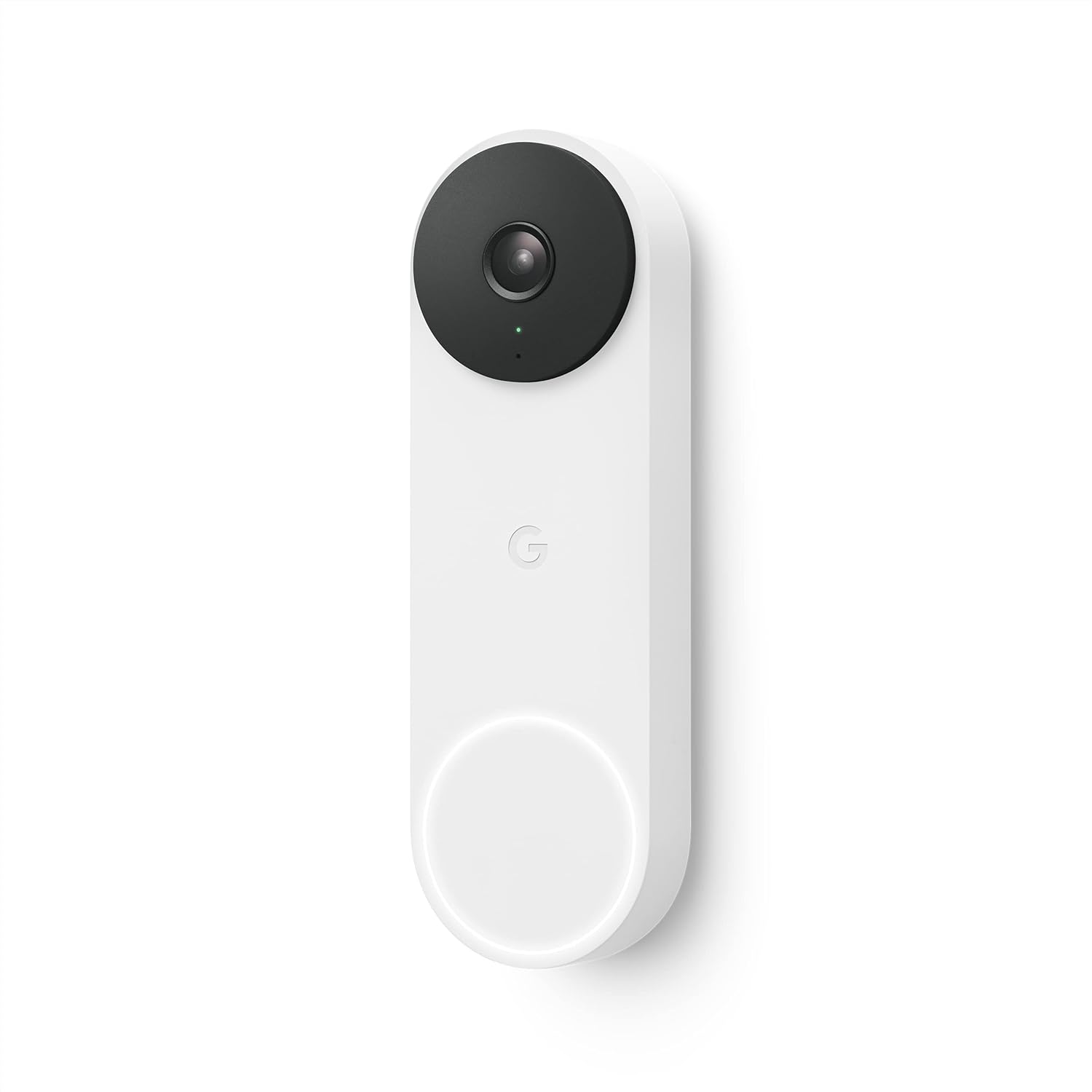
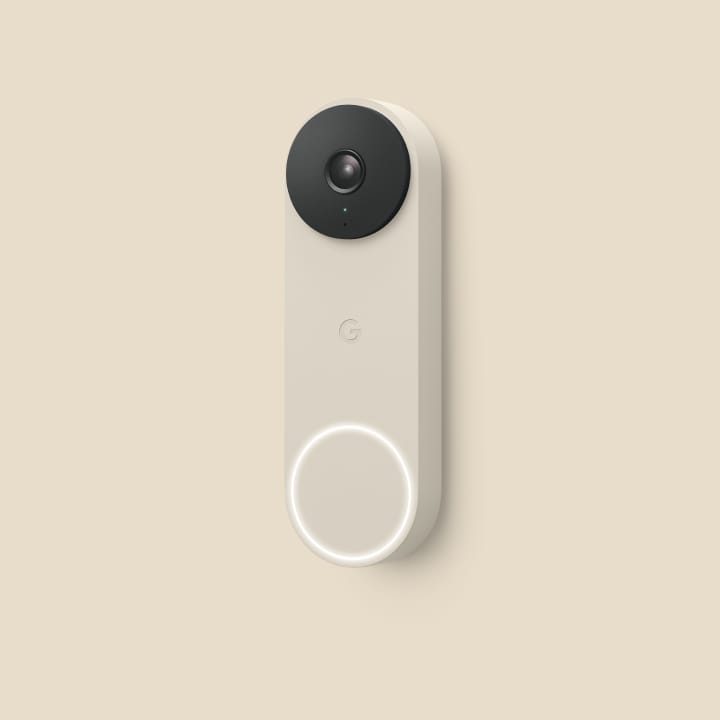
Google Nest Smart Video Doorbell Wired 2nd Generation-Snow

670.00 750.00 10.67

Hurry up! only 4 products left in stock!

Availability:
In stock
Quantity:
SKU:
SG-GA02767US

Google Nest Smart Video Doorbell Wired 2nd Generation - Snow (SKU: SG-GA02767US)

Protect your home with the Google Nest Smart Video Doorbell Wired 2nd Generation – Snow. Thanks to HDR technology, alerts that work for you and voice commands through Google Assistant, you can greet and talk to people at your door with clear confidence.

It is created for reliability and quick responses; thus, it provides constant power which is suitable for anyone seeking a reliable security system. You get HD video of 960 x 1280, in a 3:4 aspect ratio, making it easy to see each detail on every package and visitor.

If you choose to buy Google Nest Smart Video Doorbell Wired 2nd Generation – Snow, SKU: SG-GA02767US online in Dubai, you will enjoy a more efficient and convenient way to check your doorbell. The doorbell also knows people, packages, animals and vehicles and notifies you as soon as they appear on the camera.

You can find and buy the Google Nest Smart Video Doorbell Wired 2nd Gen, SG-GA02767US online through Smartgain store in Dubai. You can use the Google Home app to watch your camera’s feed from any location.

Whether you're looking to get SG-GA02767US online from Smartgain store in Dubai or just upgrading your front door tech, this product offers exceptional value and functionality for modern homes.

Key Features:

  • Crystal-clear HDR video with night vision for 24/7 clarity
  • 3:4 vertical video ratio for full-body view of visitors
  • Intelligent alerts distinguish between people, animals, vehicles, and packages
  • 24/7 streaming and video history with Nest Aware (subscription required)
  • Seamless integration with Google Assistant and Google Home
  • Wired design for consistent power—no recharging needed
  • Sleek Snow white finish complements any exterior

Obtain Google Nest Smart Video Doorbell Wired 2nd Gen, SG-GA02767US online from Smartgain store in Dubai today for ultimate peace of mind.


Product Type bestseller
Sku SG-GA02767US
Product Code GA02767-US
Category Id 25
Model GA02767-US
Status 1

1Product Overview

AttributeDetails
Product NameGoogle Nest Doorbell (wired, 2nd generation)
Product TypeWired smart video doorbell
Generation2nd Generation
ColorSnow
Video QualityHD, 960 × 1280 pixels
Video Aspect Ratio3:4
Frame RateUp to 30 FPS
Field of View145° diagonal
Night VisionYes, with HDR
Video Viewing24/7 live view
AudioTwo-way audio with noise cancellation
PowerWired, 16–24 VAC, 10–40 VA, 50/60 Hz
Connectivity2.4 GHz and 5 GHz Wi-Fi, Bluetooth Low Energy
AppGoogle Home app
Smart AlertsIntelligent alerts for people, packages, animals and vehicles
Weather ResistanceIP54
WarrantyCountry and purchase-region dependent

2Camera & Video

SpecificationDetails
Camera Sensor1.3-megapixel color sensor
Video Resolution960 × 1280 pixels
Video TypeHD video
Aspect Ratio3:4
Frame RateUp to 30 frames per second
Field of View145° diagonal
Digital Zoom6× digital zoom
Live View24/7 live view
HDRSupported
Video EncodingH.264
LensWide-angle lens designed for door-level viewing
Video OrientationVertical 3:4 view helps capture visitors from head to toe and packages near the door

3Intelligent Detection & Alerts

DetectionDetails
Person DetectionCan identify activity involving people within the camera's view
Package DetectionCan provide package-related alerts with supported features
Animal DetectionCan identify animals within the camera view
Vehicle DetectionCan identify vehicles within the camera view
Motion DetectionDetects relevant movement in the camera's field of view
Activity ZonesLets you define areas where you want activity notifications
Familiar Face AlertsAdditional familiar-face functionality may require a compatible Google Home Premium subscription
On-Device ProcessingCamera uses on-device machine learning for supported detection tasks
Feature note: Some advanced detection and history features depend on the Google Home app, subscription plan, region and current Google service availability.

4Night Vision

FeatureDetails
Night VisionBuilt-in infrared night vision
Infrared LEDs10 × 850 nm infrared LEDs
IR FilterIR cut filter
Viewing DistanceUp to approximately 10 feet / 3 metres
HDR at NightSupported HDR helps retain detail in difficult lighting conditions
Automatic Night OperationDesigned to provide visibility in low-light and dark conditions

5Audio & Communication

FeatureDetails
MicrophoneBuilt-in high-quality microphone
SpeakerBuilt-in high-quality speaker
Two-Way AudioTalk and listen through the doorbell
Noise CancellationBuilt-in noise cancellation for two-way communication
Visitor CommunicationSpeak with visitors from the Google Home app and compatible Google devices
Doorbell ChimeIncludes a chime puck for compatible installation
Quick ResponsesSupported doorbell response features can be used through the Google Home ecosystem

6Google Home & Smart Home Integration

FeatureDetails
Google Home AppRequired for setup and management
Google AccountRequired for connected services
Google Nest DisplaysCompatible Google Nest displays can show doorbell activity
Google Nest SpeakersCompatible speakers can provide supported visitor announcements
Smart Home RoutinesCan participate in compatible Google Home routines
Phone NotificationsReceive supported doorbell and activity notifications on a compatible mobile device
Web AccessGoogle Home web features may provide access to supported camera functions

7Wi-Fi & Connectivity

SpecificationDetails
Wi-Fi Standard802.11a/b/g/n/ac
Wi-Fi Frequency2.4 GHz and 5 GHz
Wi-Fi SecurityWEP, WPA, WPA2 and WPA3 encryption supported
BluetoothBluetooth Low Energy (BLE)
InternetWorking Wi-Fi internet connection required
Mobile DeviceCompatible Android phone/tablet or iPhone/iPad with BLE recommended
AppGoogle Home app
Upload SpeedAt least 2 Mbps upload speed per camera recommended for optimal 960p video quality
Network DependenceVideo streaming, notifications and cloud services can be affected by Wi-Fi or internet interruptions

8Power Requirements

SpecificationRequirement
Power TypeWired power
Voltage16–24 VAC
Transformer Rating10–40 VA
Frequency50/60 Hz
Transformer TypeCompatible low-voltage Class 2 / SELV source
BatteryNo built-in rechargeable battery for normal operation
Existing WiringDesigned to connect to compatible existing wired doorbell wiring
Power ConnectorWire connector included
Chime ConnectionChime puck included for compatible wired chime setups
Important: Do not connect the doorbell directly to mains electricity such as 110 VAC or 220 VAC. The device requires a compatible 16–24 VAC low-voltage source.

9Chime & Doorbell Wiring

ItemDetails
Chime PuckIncluded in the box
Wire ConnectorIncluded for wiring connection
Existing ChimeCompatibility should be checked before installation
TransformerRequires compatible 16–24 VAC, 10–40 VA transformer
Voltage CheckMeasure existing doorbell wiring if the transformer specification is unknown
Transformer UpgradeSome older doorbell systems may need a transformer upgrade
Installation PowerPower should be switched off before working on doorbell wiring

10Dimensions & Weight

MeasurementDetails
Height5.2 inches / 131 mm
Width1.7 inches / 42 mm
Depth1.1 inches / 28 mm
Weight4.9 oz / 140 g
ColorSnow
MountingWall mounted
Viewing Angle Adjustment20° wedge included

11Weather & Environmental Specifications

SpecificationDetails
Weather ResistanceIP54 weather resistant
Operating Temperature-4°F to 104°F / -20°C to 40°C
Relative Humidity20% to 85%
Outdoor UseDesigned for outdoor doorbell installations
Rain ResistanceWeather-resistant enclosure helps protect against normal outdoor exposure
Dust ProtectionIP54 provides protection against limited dust ingress
Extreme WeatherInstallation should avoid locations exposed to unusual heat or direct environmental stress where possible

12Privacy & Security

Security FeatureDetails
On-Device Machine LearningSupported detection processing can take place directly on the device
Secure BootHelps verify trusted software during device startup
EncryptionTLS/SSL with 128-bit AES encryption
Google AccountConnected features are associated with a Google Account
Two-Step VerificationGoogle Account security features can add an extra layer of account protection
Status LightVisible status lighting indicates supported camera activity
Security UpdatesGoogle states that legally required software and security updates will be provided

13Video History & Storage

FeatureDetails
Live View24/7 live video view is supported
Event HistoryAvailable video history depends on current Google Home service and subscription options
Nest Aware / PremiumAdditional history and advanced features may require a paid subscription
Cloud StorageSupported video history features use Google's connected cloud services
Internet DependencyCloud recording, remote viewing and notifications depend on internet connectivity
Video Quality960 × 1280 HD video
Continuous ViewLive view is available continuously; recorded history availability depends on service configuration
Subscription note: Google may change storage plans and included history over time. Advanced recording, familiar-face and other features can depend on the Google Home subscription available for your region.

14Smart Doorbell Features

FeatureHow It Works
Person AlertsProvides supported notifications when a person is detected
Package AlertsHelps identify package-related activity around the door
Animal AlertsCan identify animals in the camera view
Vehicle AlertsCan identify vehicles in the camera view
Activity ZonesLets you focus alerts on selected areas
Motion AlertsNotifies you about relevant movement
Two-Way TalkSpeak with visitors from your phone or compatible Google device
Live ViewCheck the entrance remotely through the Google Home app
Night VisionProvides visibility after dark using infrared LEDs
HDRHelps maintain image detail in challenging lighting

15Status Lights

LightPurpose
White LED RingProvides visible doorbell status indication around the button
RGB Status LEDCommunicates supported device and activity states
Camera ActivityStatus lighting can indicate when the camera is processing or streaming according to Google settings
Visitor InteractionDoorbell lighting helps visitors locate and interact with the button

16Mounting & Installation Hardware

HardwareDetails
Base PlateIncluded
20° WedgeIncluded for adjusting the camera viewing angle
Wall Screws2 included
Wall Anchors2 included
Spacers2 included
Security Screw1 extra security screw included
Hex KeyIncluded
Mounting PositionInstall where the camera has a clear view of the approach and doorway
Wedge UseUseful when the doorbell needs a different horizontal viewing angle

17Installation Guide

  1. Check the transformer: Confirm that the existing doorbell transformer provides 16–24 VAC and 10–40 VA.
  2. Check the wiring: Make sure the existing low-voltage doorbell wiring is suitable for the installation.
  3. Turn off power: Switch off power to the doorbell circuit before disconnecting any wires.
  4. Remove the existing doorbell: Carefully remove the old wired doorbell from the wall.
  5. Disconnect the wires: Keep the wiring accessible and prevent the exposed wires from touching conductive surfaces.
  6. Position the base plate: Hold the base plate against the wall and choose the correct mounting position.
  7. Use the wedge if required: Install the supplied 20° wedge if you need to change the horizontal viewing angle.
  8. Mark the holes: Mark the mounting holes through the base plate.
  9. Install anchors: Use the supplied wall anchors when mounting into suitable masonry or drywall.
  10. Secure the base: Fasten the base plate to the wall using the supplied screws.
  11. Connect the wires: Follow the Google wiring instructions and use the supplied wire connector.
  12. Install the chime puck: Connect the included chime puck according to the wiring instructions for your existing chime.
  13. Attach the doorbell: Secure the doorbell onto the mounted base.
  14. Install the security screw: Fit the security screw using the supplied hex key.
  15. Restore power: Turn the doorbell circuit back on.
  16. Open Google Home: Add the Nest Doorbell to the correct home in the Google Home app.
  17. Scan the setup code: Follow the app instructions to identify and connect the doorbell.
  18. Connect Wi-Fi: Select the appropriate 2.4 GHz or 5 GHz Wi-Fi network.
  19. Choose settings: Configure notifications, camera preferences and activity zones.
  20. Test the doorbell: Check live video, doorbell alerts, two-way audio and chime operation.
Installation note: The 2nd generation wired Nest Doorbell has higher power requirements than many older wired doorbells. Check the transformer before installation and replace it if the existing system does not meet the required specification.

18Safety Instructions

Safety PointInstruction
Power SourceUse only a compatible 16–24 VAC, 10–40 VA, 50/60 Hz source
Mains PowerNever connect the doorbell directly to 110 VAC or 220 VAC mains power
Power OffTurn off the doorbell power before working on wiring
Wire EndsKeep exposed wires separated to avoid electrical shorts
Wet ComponentsMake sure connectors and terminals are dry before powering the system
Installation LocationMount securely on a suitable wall surface
Professional HelpUse a qualified installer if transformer or wiring work is required

19What's in the Box

ItemQuantity / Details
Google Nest Doorbell1 × wired 2nd generation doorbell
Base Plate1 × mounting base
20° Wedge1 × angle adjustment wedge
Chime Puck1 × chime connector
Wire Connector1 × wiring connector
Hex Key1 × installation tool
Wall Screws2 × screws
Wall Anchors2 × anchors
Spacers2 × spacers
Security Screw1 × extra security screw
Window Decal1 × security window sticker
Quick Start GuideIncluded
Safety & Warranty DocumentIncluded

20System Requirements

RequirementDetails
Google AccountRequired
Google Home AppRequired for setup and management
Wi-Fi2.4 GHz or 5 GHz Wi-Fi network
InternetWorking broadband internet connection
Upload SpeedAt least 2 Mbps upload speed per camera recommended for optimal 960p video quality
Mobile DeviceCompatible Android or iOS device
BluetoothBluetooth Low Energy recommended for setup
Doorbell Transformer16–24 VAC, 10–40 VA, 50/60 Hz
WiringCompatible low-voltage wired doorbell connection

21Installation Considerations for Dubai & UAE

ConsiderationRecommendation
Wired InstallationCheck the existing doorbell transformer before installation
VoltageConfirm the system provides the required 16–24 VAC
Transformer PowerConfirm the transformer is rated between 10 VA and 40 VA
Outdoor PositionChoose a location with a clear view while avoiding unnecessary direct exposure to harsh conditions
Wi-Fi CoverageEnsure strong Wi-Fi coverage at the entrance
HeatThe specified operating range is -20°C to 40°C, so placement should avoid additional heat from direct sun or enclosed hot areas
Professional InstallationRecommended when transformer replacement or electrical wiring work is required

22Basic Troubleshooting

ProblemWhat to Check
Doorbell does not power onCheck the transformer voltage, VA rating, wiring connections and circuit power.
Doorbell keeps restartingCheck whether the transformer provides enough power and verify all wiring connections.
No Wi-Fi connectionCheck Wi-Fi coverage, network credentials and internet availability.
Video is delayedCheck Wi-Fi signal strength and available upload bandwidth.
Video quality is poorCheck network speed and camera settings.
No chimeCheck the chime puck wiring and compatibility of the existing chime.
Doorbell notifications missingCheck Google Home notification settings and the internet connection.
Night video is darkCheck the camera position and make sure the lens is clean and unobstructed.
Two-way audio problemCheck microphone and speaker access, phone volume and network connectivity.
Doorbell gets too hotCheck whether it is exposed to strong direct sunlight or a location outside the recommended operating range.

23Key Features at a Glance

FeatureWhat You Get
HD Video960 × 1280 video with a vertical 3:4 aspect ratio
HDRImproves detail across challenging lighting conditions
145° ViewWide diagonal field of view for the entrance area
6× Digital ZoomZoom into important parts of the live view
24/7 Live ViewCheck the entrance whenever you need to
Night Vision10 infrared LEDs with up to 10-foot viewing distance
Two-Way AudioTalk to visitors through the built-in speaker and microphone
Noise CancellationHelps make two-way conversations clearer
Person AlertsIntelligent person detection
Package AlertsSupported package activity detection
Animal AlertsSupported animal detection
Vehicle AlertsSupported vehicle detection
Activity ZonesChoose specific areas for activity notifications
Dual-Band Wi-Fi2.4 GHz and 5 GHz connectivity
Google HomeSetup and control through the Google Home app
IP54Weather-resistant outdoor design
20° WedgeIncluded for viewing-angle adjustment
Wired Power16–24 VAC, 10–40 VA power requirement

?Frequently Asked Questions

What is the Google Nest Doorbell wired 2nd generation?

It is a wired smart video doorbell with HD video, HDR, night vision, intelligent alerts, two-way audio and Google Home integration.

What color is this model?

This product is the Snow color version.

Is this the wired version?

Yes. This is the Google Nest Doorbell (wired, 2nd generation). It requires a compatible wired doorbell power supply.

What video resolution does it use?

The camera records HD video at 960 × 1280 pixels with a 3:4 aspect ratio and up to 30 FPS.

Does it support HDR?

Yes. HDR is supported for the camera video.

What is the field of view?

The doorbell provides a 145° diagonal field of view.

Does it have night vision?

Yes. It uses ten 850 nm infrared LEDs and an IR cut filter, with viewing distance up to approximately 10 feet or 3 metres.

Can I talk to visitors through the doorbell?

Yes. The built-in microphone and speaker support two-way audio with noise cancellation.

Can I see the doorbell camera from my phone?

Yes. You can use the Google Home app on a compatible mobile device to view supported live camera feeds and manage the doorbell.

Does it work with Google Home?

Yes. The Google Home app is required for setup and management.

Can it detect people?

Yes. Intelligent alerts can identify people in the camera's view.

Can it detect packages?

Yes. Supported intelligent alerts can identify package-related activity.

Can it detect animals and vehicles?

Yes. Supported intelligent alerts can identify animals and vehicles in the camera's view.

Can I create activity zones?

Yes. Activity Zones can be configured to focus notifications on selected areas.

Does it record continuously?

The doorbell supports 24/7 live view. Recorded video history depends on the current Google Home service and applicable subscription features.

Does it require a subscription?

Basic connected doorbell functionality is available without a paid subscription, while some advanced history and detection features may require a Google Home Premium subscription.

What power supply does the wired 2nd Gen require?

It requires a 16–24 VAC doorbell transformer rated at 10–40 VA and 50/60 Hz.

Can I connect it to 220V power?

No. It must not be connected directly to 220V mains electricity. It requires the specified low-voltage 16–24 VAC doorbell power source.

Will my existing doorbell transformer work?

It may work if it meets the required 16–24 VAC and 10–40 VA specifications. Older systems may require a transformer upgrade.

Does it support 5 GHz Wi-Fi?

Yes. It supports both 2.4 GHz and 5 GHz Wi-Fi.

What Wi-Fi security standards are supported?

WEP, WPA, WPA2 and WPA3 encryption are supported.

Does it support Bluetooth?

Yes. Bluetooth Low Energy is supported.

Is it suitable for outdoor installation?

Yes. The doorbell is designed for outdoor use and has an IP54 weather-resistant rating.

Can it be used in Dubai?

Yes, provided the installation has a compatible 16–24 VAC, 10–40 VA transformer and suitable Wi-Fi coverage. The specified operating temperature is up to 40°C, so placement should be planned carefully in hot outdoor conditions.

What are the dimensions?

The doorbell is approximately 131 mm high, 42 mm wide and 28 mm deep. It weighs approximately 140 g.

Does the box include an angled wedge?

Yes. A 20° wedge is included to adjust the viewing angle when needed.

Does it include a chime connector?

Yes. The package includes a chime puck for compatible wired doorbell installations.

What else comes in the box?

The package includes the doorbell, base plate, 20° wedge, chime puck, wire connector, hex key, wall screws, wall anchors, spacers, extra security screw, window decal, quick-start guide and safety/warranty documentation.

Does it have a battery?

No. This is the wired model and is designed to receive continuous power through compatible doorbell wiring.

What internet speed is recommended?

Google recommends at least 2 Mbps upload speed per camera for optimal 960p video quality.

Can I use it with Google Nest speakers?

Compatible Google Nest speakers and displays can provide supported visitor announcements and smart-home interactions.

Is the doorbell secure?

It uses secure boot, on-device machine learning and TLS/SSL with 128-bit AES encryption. Google Account security features can also be used to protect access.

Does it work without Wi-Fi?

A working Wi-Fi internet connection is required for connected features such as remote viewing, notifications and cloud services.

What should I check before installing it?

Check the transformer voltage and VA rating, doorbell wiring, Wi-Fi coverage and the available mounting position before starting installation.

Is professional installation recommended?

Professional installation is recommended when transformer replacement, electrical wiring changes or an unfamiliar doorbell system is involved.

Customer reviews

0 Reviews Write a review

Write a review

No reviews yet.

Cart

Your cart is currently empty

Continue shopping