0 Reviews

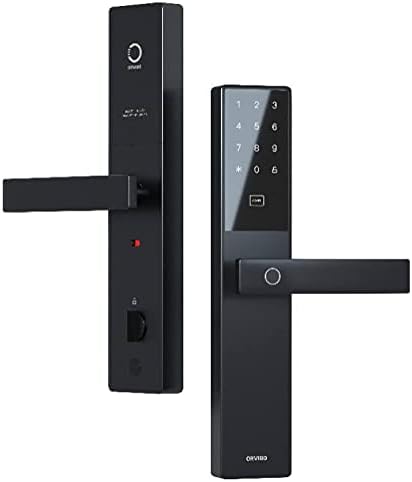
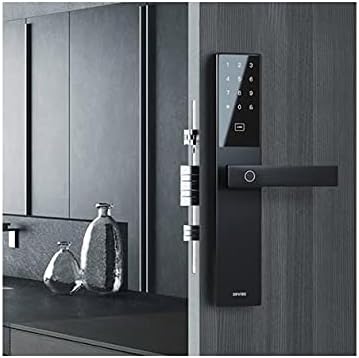
SMART DOOR LOCK C1

1050.00 1250.00 16

Hurry up! only 7 products left in stock!

Availability:
In stock
Quantity:
SKU:
SG-1110016

Smart Door Lock C1 in Dubai


Make​‍​‌‍​‍‌​‍​‌‍​‍‌ your home safer with the Smart Door Lock C1 from SG Automations Dubai.

This digital smart lock offers fingerprint, passcode, and smartphone access, thus a traditional key is not necessary.

The C1 smart lock with on-demand app control, temporary guest codes, and tamper alerts keeps your loved ones and your property safe at any time of the day or night.

Designed for apartments, villas, and offices, it is made with strong materials and can work with Google Home, Alexa, and ZigBee ​‍​‌‍​‍‌​‍​‌‍​‍‌systems.


Why Choose SG Automations Dubai


SG​‍​‌‍​‍‌​‍​‌‍​‍‌ Automations provides security systems that are intelligent and ideal for a smart home and the lifestyle of the UAE.

Have the advantage of a professional installation, support from the region, and top-quality products that harmonize contemporary design with reliable efficiency.

Product Type normal
Sku SG-1110016
Product Code SG-1110016
Category Id 32
Alternate Product Name SMART DOOR LOCK C1
Status 1

1Basic Product Information

AttributeDetails
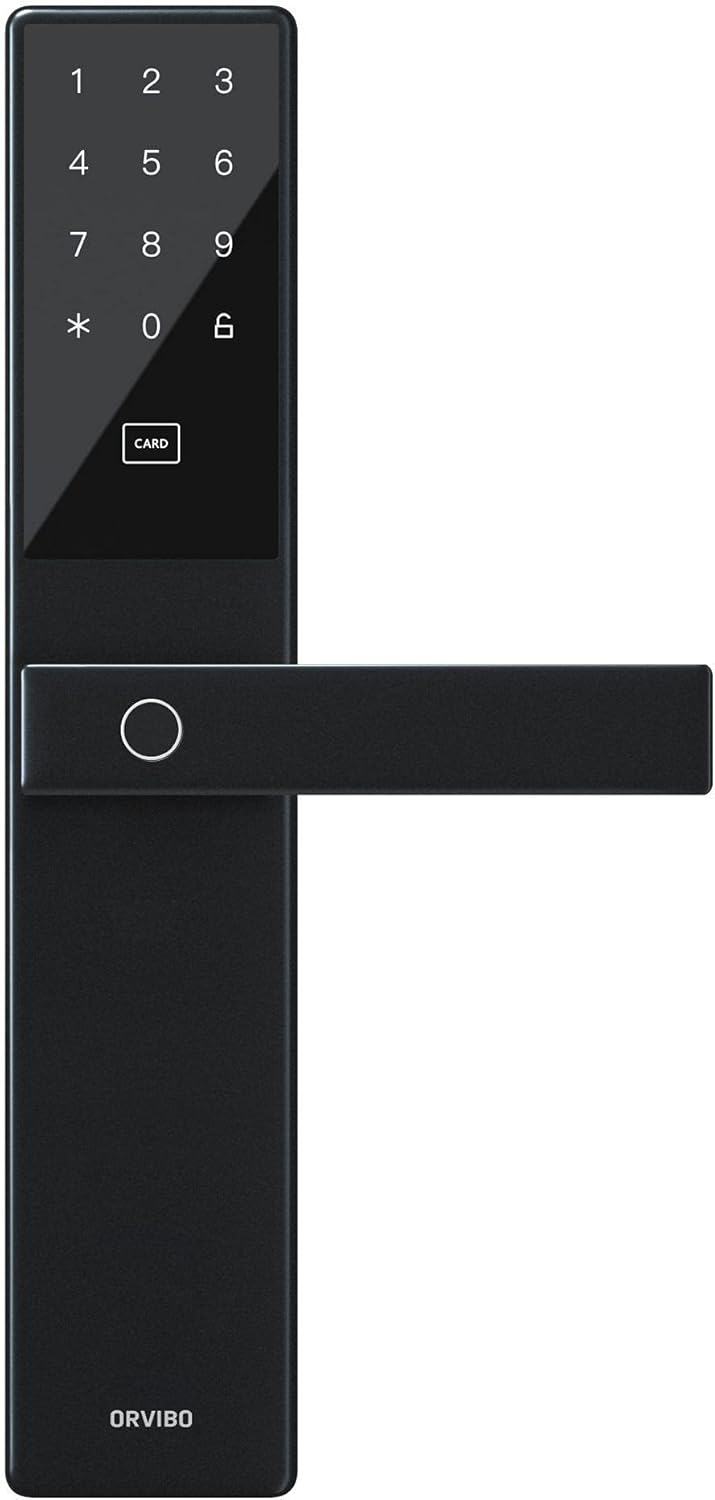
Product NameORVIBO Smart Door Lock C1
ModelC1
Product TypeSmart electronic door lock with multiple unlocking methods
BrandORVIBO
Primary UseResidential homes, villas, apartments, offices, companies and other compatible properties
Door CompatibilityDesigned for many standard wooden and security doors, subject to door dimensions and lock-body compatibility
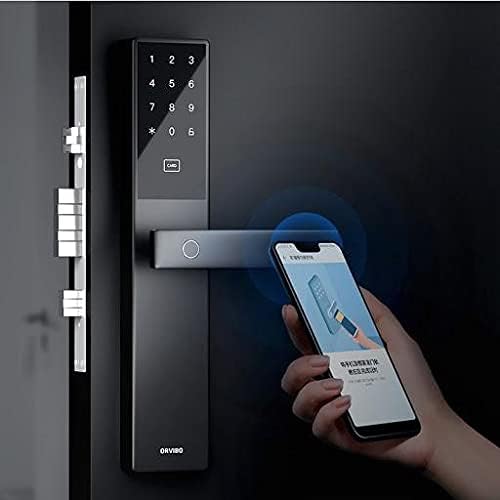
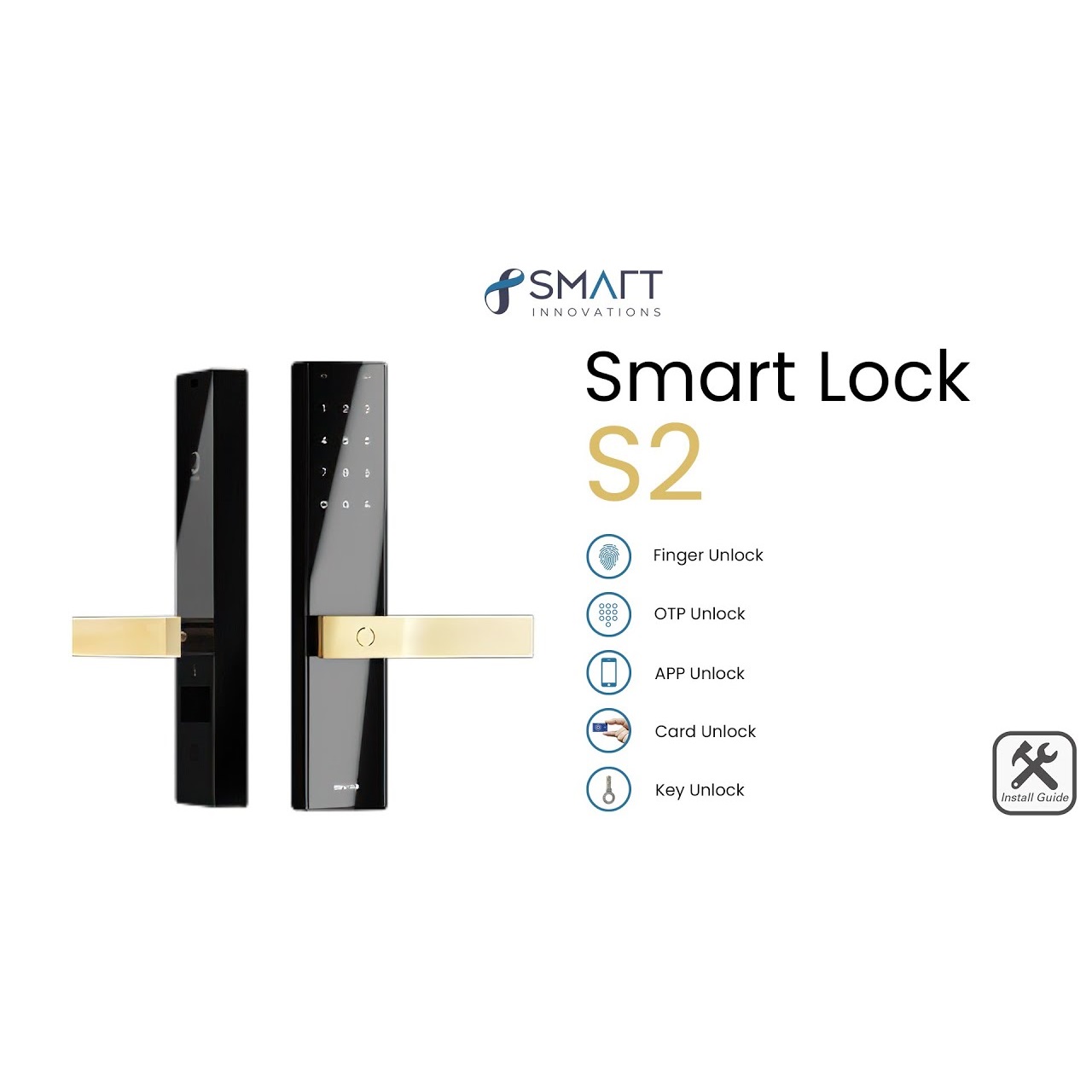
Unlocking MethodsFingerprint, password, card, mechanical key, mobile app and NFC
Wireless ConnectivityWiFi networking on the C1 version documented by ORVIBO
Gateway RequirementWiFi version supports direct networking without an additional gateway
Emergency PowerType-C emergency power interface with DC 5V input
Battery4 × AA batteries
Panel MaterialAluminum alloy, ABS and tempered glass
Smart Home IntegrationSupports intelligent linkage with compatible smart home devices through the app ecosystem

2Unlocking Methods & Access Control

MethodDetails
FingerprintBiometric fingerprint unlocking using a Swedish FPC fingerprint acquisition system
PasswordPIN/password-based electronic unlocking
Proximity / IC CardCard-based access supported by compatible cards
Mobile AppSmartphone-based access through the compatible ORVIBO app ecosystem
Mobile NFCCompatible NFC-enabled mobile devices can be used for supported NFC unlocking
Mechanical KeyTraditional mechanical key provides an alternative physical unlocking method
Number of MethodsSix primary unlocking methods are promoted for the C1: fingerprint, password, card, mechanical key, app and NFC
Emergency AccessMechanical key and emergency external power can provide access options when electronic power is unavailable

3Fingerprint Recognition

FeatureSpecification
Fingerprint TechnologyBiometric fingerprint recognition
Fingerprint ChipSwedish FPC fingerprint acquisition technology
Fingerprint RecognitionAI-assisted fingerprint recognition system designed to improve recognition as usage increases
Fingerprint False RejectionLess than 0.1% according to ORVIBO published laboratory specifications
Fingerprint False AcceptanceLess than 0.0001% according to published specifications
Fingerprint ChangesThe system is described as intelligently adapting to fingerprint changes without repeated enrollment in normal use
User CapacityUp to 25 users in the published C1 specification, with each user supporting multiple credentials
Fingerprint note: Recognition performance can vary with finger condition, installation environment, sensor condition and individual usage. Published recognition figures are laboratory values.

4Password, Card & NFC Access

FeatureDetails
Password UnlockSupports electronic password/PIN unlocking
Card UnlockSupports compatible proximity/IC card access
NFC UnlockSupports mobile phone NFC unlocking on compatible devices and configurations
Mobile UnlockSupported through the compatible ORVIBO smart home application
Temporary AccessTemporary authorization functionality is available on compatible C1 configurations
Emergency PasswordSome C1 documentation describes emergency password verification functionality
Mechanical BackupPhysical key remains available as a backup access method

5Connectivity & Smart Networking

AttributeDetails
Wireless ModuleWiFi on the ORVIBO C1 WiFi model
WiFi NetworkingDirect WiFi networking is promoted by ORVIBO
GatewayNo additional gateway is required for the WiFi version to establish network connectivity
App ConnectivityConnects with the compatible ORVIBO smart home application
Remote MonitoringNetworked configurations can provide lock status and security notifications through the app
Network StatusThe app can display online/offline networking status on supported versions
Battery StatusBattery status can be monitored through the app on networked configurations
Smart Home LinkageDoor-lock actions can trigger compatible smart home scenes and automation
Connectivity note: ORVIBO has published C1 variants and documentation with different wireless descriptions. Confirm the exact C1 variant supplied for the installation before promising WiFi, Zigbee or other network-specific functions.

6Smart Home Integration & Automation

IntegrationFunction
ORVIBO AppManage supported lock functions, status and access-related features
HomeMate EcosystemCan form part of an ORVIBO smart home environment
Lighting AutomationAn unlock event can be used to trigger compatible lighting scenes
Security ScenesLocking or unlocking can participate in configured security scenes
Welcome SceneGuest or authorized unlocking can be used to trigger compatible welcome automation
Whole-Home LinkageDoor lock actions can be linked with compatible lighting, curtains, HVAC and other smart home devices
Voice AssistantsSome C1 smart-home configurations document Amazon Alexa and Google Assistant support

7Security & Anti-Theft Protection

Security FeatureDetails
Integrated Lock BodyIntegrated metal construction is designed to resist collision, corrosion and destructive damage
C-Class CylinderPublished C1 information identifies a German double C-Class cylinder lock body/core
Anti-Pry AlarmAlarm can be triggered when abnormal prying activity is detected
Remote AlarmSupported network configurations can report violent or abnormal opening activity to the mobile app
Anti-Cat-Eye FunctionDesigned to help prevent unauthorized opening through the door's peephole mechanism
Trial-Opening ProtectionThe lock can automatically lock after repeated failed opening attempts on supported configurations
Failed Verification AlarmSome C1 documentation specifies an alarm after repeated verification failures
Emergency Unlock AlarmSupported configurations can provide an alarm notification when emergency verification is used
Low Battery AlarmLocal low-battery warning is provided, with app notification available on supported networked versions

8Encryption, Privacy & Data Security

FeatureDetails
Security ChipORVIBO describes a Swiss STM32 main control chip for secure control and communication
EncryptionFinancial-grade encryption technology is promoted for protecting communication and access data
Unique KeysORVIBO describes unique keys and certificates associated with unlocking communication security
App EncryptionApplication communication is protected using encryption mechanisms
Communication EncryptionNetwork communication is designed to protect transmitted lock information
EMP ProtectionEMP Protect technology is designed to shield the lock from electromagnetic interference and abnormal opening attempts
PrivacyAccess credentials and lock activity should be managed securely and only by authorized users

9Battery & Power Specifications

AttributeSpecification
Primary Power4 × AA batteries
Battery TypeAA alkaline batteries are specified in the published C1 documentation
Operating VoltageDC 3V
Working CurrentLess than 100mA according to ORVIBO published specifications
Standby CurrentLess than 50μA according to ORVIBO published specifications
Battery LifePublished as over 400 days under specified low-power laboratory conditions
Low Battery AlarmYes
Emergency Power InterfaceType-C
Emergency Power InputDC 5V
Emergency Power UseAllows temporary external power when internal batteries are depleted
Battery note: Battery life varies with unlocking frequency, network activity, temperature, battery quality and other operating conditions. The published 400+ day figure is a laboratory reference.

10Physical Specifications

AttributeSpecification
Panel DimensionsApproximately 352 × 70 × 67mm according to ORVIBO published C1 specifications
Alternative Published DimensionSome documentation lists approximately 352 × 67 × 70mm; confirm the measurement orientation for the supplied batch
MaterialAluminum alloy + ABS + tempered glass
Panel DesignIntegrated modern smart-lock design with electronic access interface
HandleIntegrated ergonomic door-lock handle design
Glass Panel5A-grade drilled glass panel technology is described by ORVIBO
Surface ProtectionDesigned to reduce visible fingerprints and resist everyday wear
Corrosion ResistanceORVIBO reports high corrosion resistance and salt-spray testing on the lock handle
Flame Retardant RatingUL94 V-0 is listed in published C1 specifications

11Door Compatibility & Installation Parameters

ParameterDetails
Door TypeCompatible with many standard wooden doors and security doors when dimensions match
Door ThicknessPublished C1 documentation varies by version; approximately 35mm to 120mm is cited in some documentation
Standard Hole DistanceApproximately 23.5cm is specified by ORVIBO for compatible standard door bodies
Lock BodyMust be compatible with the existing or supplied mortise/lock body
InstallationDesigned for relatively straightforward installation without complete door disassembly on compatible doors
WiringInner and outer lock bodies use a connection between the panels
CylinderCylinder length must be selected or adjusted according to door thickness and installation configuration
Professional InstallationRecommended when door dimensions, mortise configuration or existing hardware require modification
Compatibility note: Door thickness, mortise dimensions, cylinder length, hole spacing and lock-body configuration must be checked before installation. Published specifications differ between C1 documentation variants.

12Operating Environment

AttributeSpecification
Operating Temperature-20°C to 50°C according to the ORVIBO C1 installation specification
Operating Humidity0% to 90% RH according to published C1 specifications
Installation EnvironmentSuitable indoor residential and commercial door applications when installed according to product requirements
Direct Rain ExposureNot intended to be treated as an outdoor weatherproof security lock unless the exact product variant specifically states otherwise
Extreme ConditionsAvoid installation conditions outside the specified temperature and humidity range

13Design & Construction Features

FeatureDetails
Integrated Metal DesignDesigned to provide improved resistance against collision and destructive damage
Aviation-Grade MaterialORVIBO promotes an aviation-grade material concept for the C1 design
Aluminum AlloyProvides structural strength and corrosion resistance
Tempered GlassUsed as part of the electronic front panel design
3D Polished PanelPublished design information describes a deeply polished 3D panel surface
Anti-Fingerprint DesignSpecial surface and anti-unlocking technology is designed to reduce fingerprint-based password exposure
Handle DesignErgonomic integrated handle for everyday operation

14Smart Monitoring & Notifications

Monitoring FeatureDetails
Lock StatusNetworked versions can provide online/offline and lock-related status through the app
Battery StatusBattery level monitoring is supported on compatible app-connected versions
Unlock RecordsUnlock information can be recorded and displayed in the app on supported configurations
Remote NotificationSecurity-related alerts can be sent to the app when the lock is connected to the network
Low Battery NotificationLow battery alerts can be delivered locally and through the app on supported versions
Tamper NotificationAbnormal tampering or forced-opening events can trigger alerts on supported configurations
Failed VerificationRepeated failed authentication attempts can trigger a security alarm
Emergency Unlock NotificationSupported configurations can report emergency unlocking events

15Installation & Setup Instructions

  1. Check the door:Measure door thickness, lock-body dimensions, hole spacing and available mounting space before installation.
  2. Confirm compatibility:Ensure the door and mortise configuration are compatible with the C1 lock.
  3. Prepare the lock:Check the front panel, back panel, cylinder, screws, batteries, keys and other supplied components.
  4. Adjust the cylinder:Adjust the cylinder length according to the door thickness and supplied installation instructions.
  5. Install the mortise:Position and secure the compatible mortise or lock body correctly inside the door.
  6. Install batteries:Insert 4 AA batteries according to the polarity markings.
  7. Install the front panel:Position the exterior panel and secure it using the supplied screws.
  8. Install the rear panel:Position the interior panel and connect the required cable between the panels.
  9. Check mechanical operation:Operate the handle and mechanical key to confirm that the latch and cylinder move smoothly.
  10. Initialize the lock:Use the reset/initialization procedure specified for the exact C1 version.
  11. Install the app:Install the compatible ORVIBO smart home application on a supported smartphone.
  12. Add the lock:Follow the application's device-pairing instructions.
  13. Connect the network:Connect the supported C1 version to the required wireless network.
  14. Register administrator access:Set the administrator credentials according to the application's setup procedure.
  15. Add fingerprints:Register authorized fingerprints and test recognition.
  16. Add passwords:Create secure user passwords/PINs for authorized users.
  17. Add cards:Register compatible access cards where required.
  18. Configure NFC:Set up compatible mobile NFC unlocking if supported by the phone and C1 configuration.
  19. Configure alerts:Enable low-battery, tamper, failed-verification and other available notifications.
  20. Test smart automation:Test supported lighting, security or other smart-home scenes after successful pairing.
  21. Test emergency access:Keep the mechanical keys in a safe location outside the locked property and understand the Type-C emergency power procedure.

16Initialization & Reset

FunctionDetails
Factory InitializationThe C1 manual describes opening the front-panel cover and using the reset control on the rear panel.
Reset ProcedureOne published C1 manual specifies holding the reset button for approximately 5 seconds and entering the initialization command.
Default InitializationThe published manual specifies a default initialization sequence for the applicable C1 version.
After ResetPreviously configured users and access credentials may need to be registered again after factory initialization.
SafetyDo not reset the lock unless authorized, because resetting can remove previously configured access information.
Reset note: C1 hardware and firmware versions can differ. Use the initialization sequence supplied with the exact lock rather than applying a procedure from another C1 variant.

17What's Included

ItemDetails
Front Panel1 × exterior smart lock panel
Back Panel1 × interior lock panel
Mechanical Keys2 × mechanical keys according to the published C1 manual
Access Cards3 × cards according to the published C1 manual
M5 × 50mm Screw1 × according to the published packing list
M5 × 70mm Screw1 × according to the published packing list
2.0mm Screwdriver1 × according to the published packing list
2.5mm Screwdriver1 × according to the published packing list
Batteries4 × AA batteries are required; package inclusion can vary by seller/package
Installation HardwareHardware supplied according to the applicable package and door configuration
User DocumentationInstallation/user documentation supplied according to the package

18Key Features & Advantages

FeatureBenefit
Fingerprint UnlockProvides convenient biometric access without carrying a key.
Password UnlockProvides keyless access using a personal PIN/password.
Card UnlockProvides convenient access using a compatible access card.
Mobile AppProvides smart access and monitoring functions through a compatible app.
NFC UnlockAllows supported smartphones to be used for convenient NFC access.
Mechanical KeyProvides a physical backup when electronic access is unavailable.
WiFi NetworkingAllows supported C1 versions to connect directly to the network without an additional gateway.
AI Fingerprint RecognitionDesigned to improve fingerprint recognition through adaptive recognition technology.
400+ Day Battery ReferenceLow-power operation can provide extended battery life under specified conditions.
Anti-Pry AlarmHelps alert users to abnormal prying or tampering attempts.
Anti-Cat-Eye ProtectionHelps prevent unauthorized operation through the door's peephole mechanism.
Failed Attempt ProtectionRepeated unsuccessful authentication can trigger security protection.
Low Battery AlertWarns users when the internal battery needs replacement.
Emergency Type-C PowerAllows temporary external power when the internal batteries are depleted.
Financial-Grade EncryptionDesigned to protect communication and access-related data.
EMP Protect TechnologyHelps protect against electromagnetic interference and abnormal opening attempts.
Smart Home LinkageDoor events can trigger compatible lighting, security, curtain and other automation scenes.
Integrated Metal ConstructionProvides a durable structure designed to resist everyday impact and tampering.
C-Class CylinderProvides a higher-security mechanical cylinder configuration on the applicable C1 version.
Modern Glass PanelCombines electronic controls with a contemporary smart-home appearance.

19Recommended Applications

ApplicationRecommended Use
Villa EntranceKeyless access and smart security for villa main doors.
ApartmentConvenient fingerprint, password, card and mobile access.
HomeEveryday keyless entry for family members.
OfficeControlled access for employees and authorized personnel.
Company EntranceMulti-user electronic access management.
Rental PropertyConvenient access management for authorized residents or guests on supported configurations.
Smart VillaIntegration with lighting, security and other smart-home automation scenes.
Smart OfficeCan form part of a connected access and automation system.

20Maintenance & Care

Maintenance ItemRecommendation
Battery ReplacementReplace batteries promptly when the low-battery warning appears.
Battery TypeUse the specified AA battery type and do not mix old and new batteries.
Fingerprint SensorKeep the sensor clean and dry for reliable recognition.
Glass PanelClean with a soft, suitable cloth and avoid abrasive materials.
Mechanical KeyKeep emergency mechanical keys in a secure location outside the locked area.
HandleCheck periodically for abnormal looseness, resistance or unusual operation.
Lock BodyKeep the latch and lock mechanism free from obstructions.
NetworkMaintain reliable wireless coverage where app and remote features are required.
FirmwareKeep the compatible smart-home application and supported lock firmware updated when updates are available.
CleaningDo not use aggressive chemicals, excessive water or abrasive cleaners on electronic surfaces.

21Common Troubleshooting

ProblemPossible Cause & Solution
Fingerprint Not RecognizedClean the sensor and finger, use the registered finger correctly, or re-register the fingerprint if required.
Password Not WorkingCheck that the password is correctly registered and entered. Verify the lock has sufficient battery power.
Card Not WorkingConfirm that the card is compatible and registered to the lock.
App Cannot ConnectCheck wireless signal, smartphone connectivity, app permissions and the lock's network status.
Low Battery WarningReplace all batteries with a fresh matching set of the specified type.
Lock Does Not RespondCheck battery installation and power. Use the Type-C emergency power interface if the internal batteries are depleted.
Handle Feels TightCheck door alignment, latch pressure, lock-body installation and mechanical obstructions.
Unexpected AlarmCheck for failed authentication attempts, tampering, forced opening or emergency unlocking.
Remote Notifications MissingCheck network connectivity, app configuration and notification permissions.
Door Will Not LockCheck door alignment and make sure the latch and lock body are not obstructed.

22Important Product Notes

PointInformation
Product VariantORVIBO has published more than one C1 documentation/configuration. Confirm the exact hardware variant supplied before installation.
Wireless VersionThe ORVIBO official C1 page documents WiFi direct networking without an additional gateway.
Zigbee VersionSome third-party C1 documentation identifies Zigbee 3.0 for a C1-ZB variant. Do not assume Zigbee support unless it is specified for the supplied model.
Door ThicknessPublished documents differ on supported door thickness. Measure the actual door and confirm compatibility before ordering or installation.
BatteryUses 4 AA batteries with published low-power standby current below 50μA.
Battery LifeORVIBO publishes over 400 days under specified laboratory conditions; actual battery life varies with usage and environment.
Emergency PowerType-C emergency power interface accepts DC 5V according to the published C1 installation parameters.
Mechanical BackupMechanical keys should be stored outside the property in a secure emergency location.
SecurityAnti-pry, anti-cat-eye, failed-attempt and low-battery security functions are documented for the C1 platform, with availability depending on version.
Smart AutomationCompatible door-lock events can trigger smart-home scenes such as lighting and security automation.
PrivacyAccess credentials and unlocking information should only be provided to authorized users.
InstallationDoor measurements and lock-body compatibility should be checked before installation.
Published SpecificationsORVIBO notes that laboratory specifications can vary from actual results because of product version, software, installation and environmental conditions.
Dubai InstallationFor Dubai homes, villas and offices, professional installation is recommended where door modification or existing mortise replacement is required.

?Frequently Asked Questions

What is the ORVIBO Smart Door Lock C1?

The ORVIBO Smart Door Lock C1 is a smart electronic door lock designed for compatible homes, villas, apartments and offices. It supports fingerprint, password, card, mechanical key, mobile app and NFC unlocking.

How many ways can the Smart Door Lock C1 be unlocked?

The C1 is promoted with six primary unlocking methods: fingerprint, password, card, mechanical key, mobile app and NFC.

Does the C1 support fingerprint unlocking?

Yes. The C1 uses biometric fingerprint recognition and published ORVIBO specifications identify Swedish FPC fingerprint acquisition technology.

Does Smart Door Lock C1 support passwords?

Yes. Password or PIN-based electronic unlocking is supported.

Does the C1 support cards?

Yes. Compatible access cards can be registered and used for electronic unlocking.

Can I unlock the C1 with my phone?

Yes. Mobile app unlocking is supported, and compatible phones can also use NFC unlocking where the relevant C1 configuration and phone support it.

Does the Smart Door Lock C1 support NFC?

Yes. ORVIBO promotes phone NFC unlocking for compatible devices and configurations.

Does Smart Door Lock C1 have a mechanical key?

Yes. Mechanical keys provide a physical backup unlocking method.

Does the C1 connect to WiFi?

The ORVIBO WiFi C1 version supports direct WiFi networking and does not require an additional gateway for network connectivity.

Does the C1 require a gateway?

The WiFi version documented by ORVIBO can connect directly to WiFi without an additional gateway.

Does every C1 support Zigbee?

Not necessarily. Some documentation identifies a C1-ZB variant with Zigbee, while ORVIBO's official C1 WiFi documentation describes direct WiFi networking. Confirm the exact model supplied.

What batteries does the C1 use?

The published C1 specification uses four AA batteries and lists a DC 3V operating voltage.

How long does the C1 battery last?

ORVIBO publishes battery life of more than 400 days under specified low-power laboratory conditions. Actual battery life depends on usage, network activity, temperature and battery quality.

What happens when the C1 batteries run out?

The C1 includes a Type-C emergency power interface. A compatible DC 5V external power source can be used to provide temporary power, while the mechanical key provides another backup access method.

Does the C1 have a low battery alarm?

Yes. The C1 provides a low-battery warning, and supported networked configurations can also provide app notifications.

Does Smart Door Lock C1 have anti-theft protection?

Yes. Published C1 security features include anti-pry protection, anti-cat-eye unlocking protection, failed-attempt protection and security alarms on supported configurations.

Does the C1 have an anti-pry alarm?

Yes. ORVIBO documents an anti-pry lock alarm designed to alert users when abnormal prying activity is detected.

Does the C1 have an anti-cat-eye function?

Yes. The anti-cat-eye function is designed to help prevent unauthorized operation through the door's peephole mechanism.

What happens after multiple failed unlock attempts?

ORVIBO documents trial-opening protection that can automatically lock the door after repeated unsuccessful attempts on supported configurations.

Does the C1 send security notifications?

Supported networked versions can send notifications for events such as tampering, low battery, emergency unlocking and other security conditions.

Can the C1 monitor battery status?

Yes. Networked configurations can display battery status through the compatible app.

Can I check lock status from the app?

Supported networked versions can display networking and lock-related status through the compatible ORVIBO smart home app.

Does the C1 record unlocking information?

Supported configurations can record unlocking information and make it available through the app.

Can the C1 work with smart home automation?

Yes. The C1 can participate in smart-home scenes, allowing door-lock events to trigger compatible lighting, security and other automation functions.

Can the C1 turn on lights when the door is unlocked?

Yes. ORVIBO demonstrates whole-home intelligent linkage where opening the lock can trigger compatible smart-home lighting and other devices.

Does Smart Door Lock C1 support Alexa?

Some C1 smart-home configurations document Amazon Alexa support. Availability can depend on region, firmware and the exact C1 configuration.

Does Smart Door Lock C1 support Google Assistant?

Some C1 documentation identifies Google Assistant support. Availability can depend on region, firmware and the exact product configuration.

What material is the C1 made from?

ORVIBO's published C1 specification identifies aluminum alloy, ABS and tempered glass for the lock construction and panel.

What are the dimensions of the C1?

ORVIBO publishes approximately 352 × 70 × 67mm for the C1 panel, while some documentation presents the same dimensions in a different measurement order.

What doors are compatible with the C1?

The C1 is designed for many standard wooden and security doors, provided the door thickness, hole spacing, mortise and cylinder dimensions are compatible.

What door thickness does the C1 support?

Published C1 documents vary by version, with approximately 35mm to 120mm appearing in some documentation. The actual door should be measured before installation.

What is the standard hole distance for C1 installation?

ORVIBO's installation information identifies approximately 23.5cm as the standard hole distance for compatible standard door bodies.

Can the C1 be installed without replacing the entire door?

The C1 is designed for compatible standard doors and can be installed without complete door disassembly when the existing door and lock-body configuration meet the installation requirements.

Is professional installation recommended?

Professional installation is recommended when the door requires mortise modification, cylinder adjustment, hardware replacement or electrical/electronic setup.

What is the operating temperature of the C1?

The official ORVIBO installation specification lists an operating temperature range of approximately -20°C to 50°C.

What is the operating humidity range?

The published C1 specification lists an operating humidity range of approximately 0% to 90% RH.

Is the C1 suitable for Dubai villas?

Yes, when installed on a compatible door and within the specified operating environment. It is suitable for smart access control in villas, homes and offices, with fingerprint, password, card, mobile and key access.

Can the C1 be used in an office?

Yes. Its multi-user access methods can make it suitable for offices, companies and other compatible commercial doors.

How many users can the C1 support?

The official C1 specification lists up to 25 users, with each user supporting multiple fingerprints, passwords and cards. Other C1 variants may have different capacities.

Is the C1 secure against electromagnetic interference?

ORVIBO promotes EMP Protect technology designed to shield the lock against electromagnetic interference and help prevent abnormal opening.

Does the C1 use encryption?

Yes. ORVIBO describes financial-grade encryption technology, encrypted app communication and communication security using keys and certificates.

What should I do if the fingerprint does not work?

Clean the fingerprint sensor and finger, try again with the registered finger, ensure the finger is positioned correctly, and re-register the fingerprint if necessary.

What should I do if the app cannot connect?

Check the lock's network status, wireless coverage, smartphone connection, application permissions and pairing configuration. Re-pair the device if required.

What should I do if the door lock makes an unusual noise?

Check the door alignment, latch, lock body and installation screws for mechanical obstruction or looseness. Professional inspection is recommended if the problem continues.

Where should I keep the mechanical keys?

Keep the emergency mechanical keys in a secure location outside the property so they remain available if the electronic system loses power.

Does the C1 come with batteries?

The lock requires four AA batteries. Whether batteries are included depends on the exact sales package, so confirm the package contents before installation.

Are all C1 specifications identical?

No. Published C1 documentation contains differences between versions, including wireless technology, door-thickness ranges and user-capacity details. The exact supplied model and documentation should be treated as the final reference.

Customer reviews

0 Reviews Write a review

Write a review

No reviews yet.

Cart

Your cart is currently empty

Continue shopping