0 Reviews

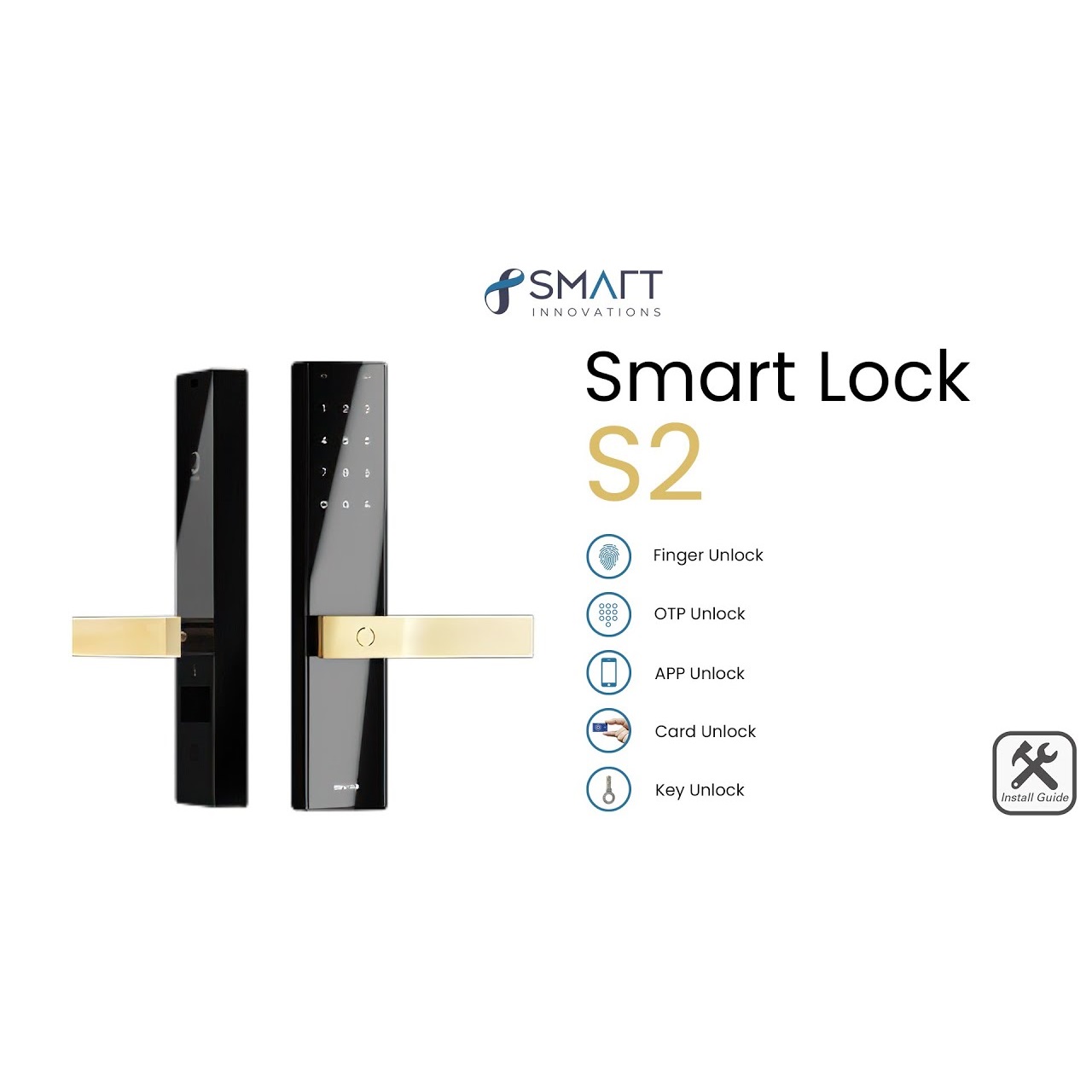
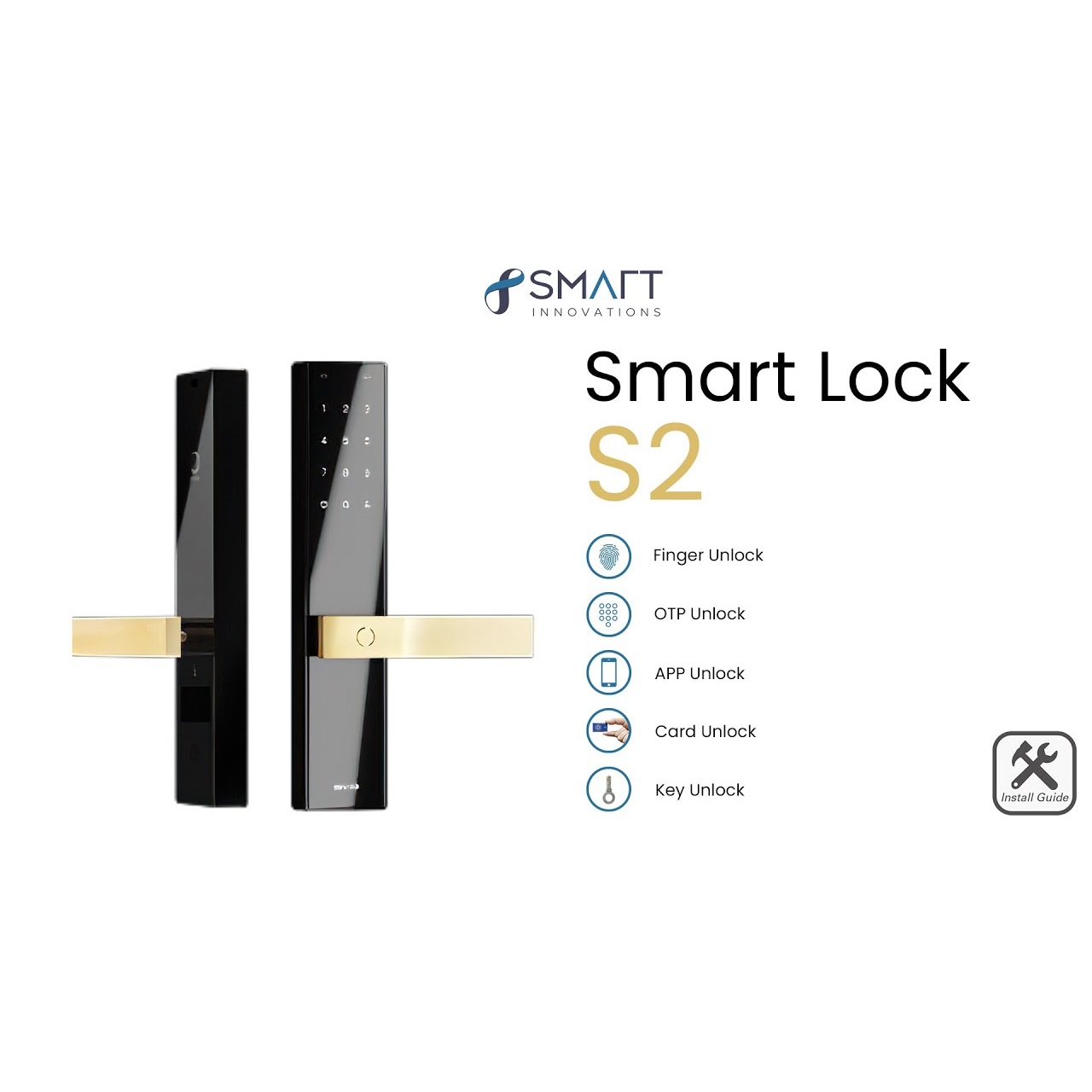
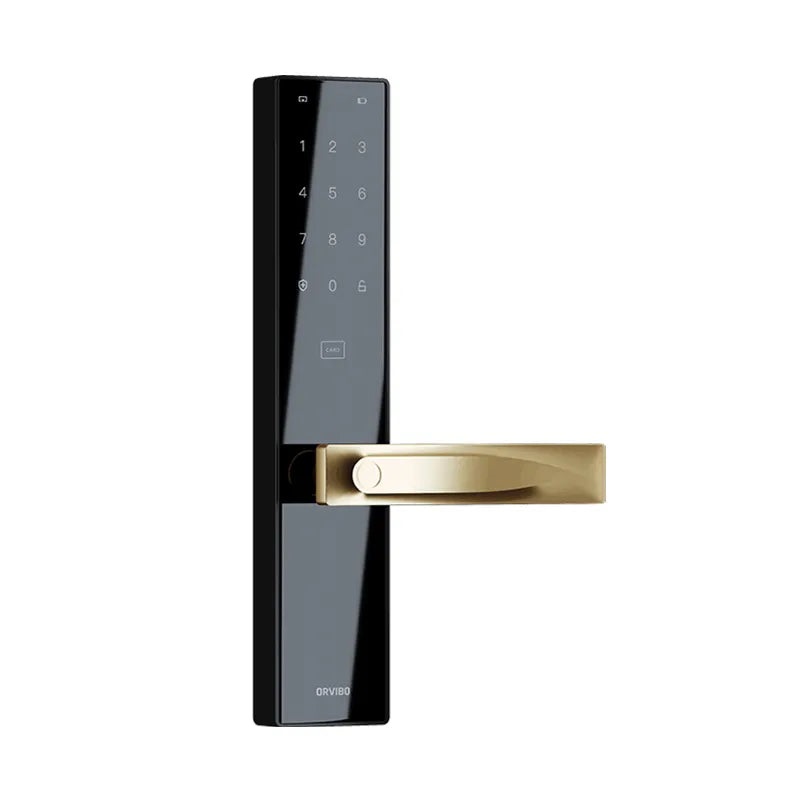
Smart Door Lock S2

2450.00 2700.00 9.26

Hurry up! only 5 products left in stock!

Availability:
In stock
Quantity:
SKU:
SG-1110015

Smart Door Lock S2 in Dubai


Boost​‍​‌‍​‍‌​‍​‌‍​‍‌ the safety of your home with the Smart Door Lock S2 by SG Automations Dubai.

This future-oriented electronic door lock features user identification through fingerprint, access via passcode, RFID cards, and control through a mobile app — a perfect harmony of technology in a single stylish device.

You can enjoy immediate unlock alerts, auto-lock functionalities, and the ability to create temporary access codes for your guests or the cleaning staff.

Whether it is an apartment, a villa, or an office that you want to secure efficiently, the S2 smart lock is compatible with most standard doors and can be easily connected with Google Home, Alexa, and ZigBee ​‍​‌‍​‍‌​‍​‌‍​‍‌systems.


Why Choose SG Automations Dubai


SG​‍​‌‍​‍‌​‍​‌‍​‍‌ Automations offers dependable smart home security solutions that are trusted all over Dubai and the UAE.

We take care of everything for you from the installation to the setup of your Smart Door Lock S2. Together with our team, you can be sure that the device will bring safety, convenience, and peace of mind that have never been experienced ​‍​‌‍​‍‌​‍​‌‍​‍‌before.

Product Type normal
Sku SG-1110015
Product Code SG-1110015
Category Id 32
Alternate Product Name Smart Door Lock S2
Status 1

1Basic Product Information

AttributeDetails
Product NameSmart Door Lock S2
Product ModelS2
Product TypeWiFi-enabled smart electronic door lock
Primary UseSmart access control and keyless security for homes, villas, apartments and offices
Unlocking MethodsFingerprint, password, NFC card, encryption card, remote authorization and mechanical key
Wireless NetworkingWiFi
Smart Home IntegrationORVIBO smart home ecosystem with compatible smart-home control
Remote AccessSupported through compatible smart-home/app functionality
Emergency PowerUSB Type-C 5V emergency power interface
Door CompatibilityDesigned for compatible wooden and metal/aluminum doors subject to lock-body and installation requirements

2Design & Construction

AttributeSpecification
Front Panel337 × 67 × 71.3mm including handle height
Rear Panel337 × 67 × 71.3mm including handle height
Guide Plate24 × 240 × 3mm standard
ConstructionIntegrated smart door-lock panel design
MaterialZinc alloy construction with tempered glass elements; product documentation also references stainless-steel components
HandleIntegrated smart lock handle
Lock CylinderSmart electromechanical lock cylinder; product documentation references a C-class cylinder with 304 stainless-steel body
Display / KeypadTouch-sensitive keypad interface for password entry and lock operation
Fingerprint SensorIntegrated fingerprint recognition sensor
Card ReaderIntegrated NFC / encrypted card reader

3Unlocking Methods

MethodDetails
FingerprintUnlock the door using registered fingerprints.
PasswordUnlock using a registered access password.
Virtual PasswordSupports virtual-password entry to help prevent password exposure when someone is observing the keypad.
NFC CardSupports compatible mobile-phone NFC access functionality.
Encryption CardSupports encrypted access cards designed to reduce unauthorized card copying.
Remote AuthorizationAuthorized users can issue or manage temporary access through compatible app functionality.
Mechanical KeyProvides a physical backup unlocking method.
Temporary PasswordTemporary access credentials can be issued for guests or service personnel through supported smart-home functionality.

4Fingerprint Recognition

FeatureDetails
Fingerprint UnlockSupported
Fingerprint SensorIntegrated biometric fingerprint sensor
Recognition TechnologyFingerprint recognition using an advanced biometric recognition algorithm
Normal FingerprintsUp to 3 fingerprints per supported user profile according to manufacturer documentation
Emergency Fingerprint1 emergency fingerprint per supported user profile according to manufacturer documentation
Fingerprint CapacityUser capacity specifications vary by documentation/version; manufacturer documentation states 25 users with fingerprint profiles and 5 temporary users.
RecognitionDesigned for fast and secure fingerprint-based access

5Password & Access Code Functions

FeatureDetails
Password UnlockSupported
Virtual PasswordSupports entering additional digits before or after the correct password to help prevent visual password theft.
Temporary PasswordTemporary access passwords can be issued for authorized visitors.
Ordinary PasswordSupported
Emergency PasswordSupported according to manufacturer documentation
Password Capacity25 users plus 5 temporarily authorized users according to ORVIBO specification
Access ManagementAccess credentials can be managed through compatible smart-home/app functions.

6Card & NFC Access

FeatureDetails
Card UnlockingSupported
NFCSupported
Mobile Phone NFCSupported for compatible mobile-phone NFC access functionality
Encryption CardSupported
Card SecurityEncrypted access-card technology is designed to reduce unauthorized copying.
Cards Included2 cards according to ORVIBO specification

7WiFi & Smart Connectivity

AttributeDetails
Wireless TechnologyWiFi
WiFi NetworkingConnects to a network through WiFi to enable network-based smart functions.
Remote ManagementSupported through compatible ORVIBO smart-home/app functionality.
Smart Home PlatformORVIBO smart home ecosystem
Smart ScenesCan participate in compatible smart-home scene and automation functions.
Voice InteractionCan integrate with compatible smart-home voice-control environments.
GatewayWiFi networking is integrated according to the ORVIBO S2 specification.

8Power & Battery

AttributeSpecification
Operating Voltage7.5V
Battery TypeLR6 / AA alkaline batteries
Battery Quantity10 AA batteries, arranged as 5 batteries per group according to manufacturer documentation
Working CurrentLess than 150mA according to product documentation
Standby CurrentLess than 60μA according to product documentation
Low Battery AlertYes
Emergency PowerUSB Type-C 5V emergency power input
Battery CompartmentLocated on the rear panel
Battery note: Replace batteries when the low-voltage warning appears. Keep the mechanical keys in a secure, accessible location as a backup.

9Security & Alarm Functions

FeatureDetails
Anti-Prying AlarmSupported
Emergency Unlocking AlarmSupported
Unlock Verification Failure AlarmSupported
Low Voltage AlarmSupported
Unauthorized Access AlertSecurity alerts can be generated for supported abnormal access events.
Unlocking NotificationSupported smart-home/app functionality can provide access notifications.
Door Status MonitoringBuilt-in sensing functions monitor relevant lock and door conditions.
Anti-Tamper ProtectionDesigned with anti-violent-dismantling and security monitoring functions.
Privacy ProtectionIndoor lock operation and access-control functions provide additional protection for occupants.

10Built-In Sensors & Monitoring

Sensor / FunctionPurpose
Anti-Violent Dismantling SensorDetects attempted forced removal or tampering.
Front Handle SensorMonitors relevant front-handle activity.
Door State SensorMonitors door-related status.
Mechanical Key DetectionDetects supported mechanical-key unlocking activity.
Rear Handle SensorMonitors relevant rear-handle operation.
Touch Screen SensorDetects touch interaction with the lock interface.
Anti-Lock State SensorMonitors the lock state for supported security functions.
Fingerprint SensorCaptures and verifies registered fingerprints.

11Lock Body & Cylinder

AttributeDetails
Lock CylinderSmart electromechanical lock cylinder
Cylinder MaterialManufacturer documentation references German pure copper C-class cylinder construction with 304 stainless-steel body.
Lock BodyCompatible standard lock-body configurations are available depending on the installation version.
Guide Plate24 × 240 × 3mm standard
Mechanical BackupMechanical key unlocking is supported.
Dual SecurityIndependent electromechanical verification and motorized clutch functions provide an additional layer of access verification.

12Smart Home Integration

Platform / FunctionSupport
ORVIBO Smart HomeSupported
WiFi Smart HomeSupported
Google HomeListed on the SG Automations product page as compatible.
Amazon AlexaListed on the SG Automations product page as compatible.
ZigBee SystemsListed on the SG Automations product page as compatible with ZigBee systems.
Smart ScenesCompatible ORVIBO smart-home systems can use lock events in supported automation scenes.
Remote AuthorizationSupported
Temporary AccessSupported through compatible smart-home/app functions.

13User & Access Management

FunctionDetails
User Capacity25 users according to ORVIBO specification
Temporary Users5 temporarily authorized users
Fingerprint Profiles3 normal fingerprints and 1 emergency fingerprint per user according to documentation
Access CredentialsFingerprint, password, card, NFC, remote authorization and mechanical key
Guest AccessTemporary passwords and remote authorization can be used for guests or service personnel.
Access NotificationsSupported through compatible smart-home/app functionality.
Operation RecordsAccess and operation records can be available through compatible app/smart-home interfaces.

14Installation & Door Requirements

RequirementDetails
Installation TypeReplacement smart door-lock installation
Suitable DoorsCompatible standard doors subject to lock-body dimensions and door preparation
Front Panel Size337 × 67 × 71.3mm including handle height
Rear Panel Size337 × 67 × 71.3mm including handle height
Guide Plate24 × 240 × 3mm standard
Door Opening DirectionDoor direction must be checked before installation and handle orientation adjusted accordingly.
WiringFront and rear panel wiring must be connected correctly during installation.
Battery InstallationInstall batteries in the rear-panel battery compartment with correct polarity.
Professional InstallationProfessional installation is recommended where door preparation or lock-body replacement is required.

15Setup & Configuration Instructions

  1. Check the door:Confirm the door type, opening direction, existing lock body and available installation space.
  2. Prepare the lock:Check the front panel, rear panel, mortise/lock body, handles, screws and supplied accessories.
  3. Install the lock body:Fit the compatible mortise or lock body securely into the door.
  4. Install the square shaft:Select the appropriate shaft and accessories according to the door thickness and installation configuration.
  5. Install the front panel:Align the front panel and handle assembly with the prepared door holes.
  6. Install the rear panel:Position and secure the rear panel from the inside of the door.
  7. Connect the wiring:Connect the front and rear panel wiring correctly and ensure that cables are not pinched.
  8. Install batteries:Insert the specified AA/LR6 batteries with correct polarity.
  9. Check the handle:Confirm that the handle operates correctly and matches the door-opening direction.
  10. Initialize the lock:Follow the manufacturer's initialization procedure before registering users.
  11. Configure access methods:Register fingerprints, passwords and cards as required.
  12. Connect WiFi:Follow the compatible ORVIBO app or smart-home setup process to connect the lock to the network.
  13. Configure remote access:Enable supported remote authorization and temporary access features.
  14. Test every unlocking method:Test fingerprint, password, card/NFC, app authorization and mechanical key operation.
  15. Test alarms:Check low-battery and supported security-alert functions.
  16. Complete smart-home integration:Add the lock to compatible ORVIBO scenes or supported smart-home systems.

16What's Included

ItemDetails
Smart Door Lock1 × Smart Door Lock S2 assembly
Front Panel1 × front panel
Rear Panel1 × rear panel
Lock Body / MortiseCompatible mortise/lock-body components according to package configuration
Cards2 × cards according to ORVIBO specification
Mechanical KeysMechanical backup keys according to applicable package
Square ShaftApplicable shaft components for installation
Mounting ScrewsInstallation screws and related hardware according to package
BatteryAA/LR6 batteries required for operation; check package contents before installation
User DocumentationInstallation and user documentation

17Key Features & Advantages

FeatureBenefit
Fingerprint UnlockProvides convenient biometric access without carrying a physical key.
Multiple Unlock MethodsSupports fingerprint, password, NFC/card, remote authorization and mechanical key access.
WiFi ConnectivityEnables network-based smart access and remote-management functions.
Temporary AccessUseful for guests, cleaners, maintenance teams and other authorized visitors.
Virtual PasswordHelps reduce the risk of password exposure when entering a PIN in front of others.
Anti-Prying AlarmProvides an alert when supported tampering activity is detected.
Low Battery AlertWarns users when battery power is running low.
Emergency USB-C PowerProvides temporary power if the installed batteries are depleted.
Mechanical Backup KeyProvides an alternative access method during emergencies.
Smart Home IntegrationCan connect with compatible smart-home systems and automation scenes.
Built-In SensorsMultiple sensors help monitor door and lock conditions.
Smart NotificationsSupported access events can be communicated through compatible smart-home/app functions.
Modern DesignCombines a contemporary smart-lock appearance with an integrated handle design.
Home & Office UseSuitable for compatible residential and commercial access-control applications.

18Complete Technical Specifications

SpecificationValue
Product ModelS2
BrandORVIBO
Product CategorySmart Door Lock
Front Panel337 × 67 × 71.3mm including handle height
Rear Panel337 × 67 × 71.3mm including handle height
Guide Plate24 × 240 × 3mm standard
Operating Voltage7.5V
Battery10 LR6 / AA alkaline batteries, 5 cells per group
Working Current<150mA
Standby Current<60μA
Wireless NetworkingWiFi
Unlock MethodsFingerprint, password, NFC card, encryption card, remote authorization and mechanical key
Password Capacity25 users plus 5 temporary users
Fingerprint Profile3 normal fingerprints and 1 emergency fingerprint per user according to manufacturer documentation
Emergency PowerUSB Type-C 5V
Cards2 pcs
Working Temperature-20°C to 60°C
Working Humidity10% to 90% RH
MaterialZinc alloy, tempered glass and applicable metal components
Alarm FunctionsLow voltage, anti-prying, emergency unlocking and unlocking verification failure

19Recommended Applications in Dubai

ApplicationRecommended Use
Villa EntranceKeyless access for main residential entrances.
Apartment DoorSmart access control for compatible apartment doors.
Office EntranceControlled access for offices and small commercial spaces.
Staff AccessProvide authorized employees with individual access credentials.
Guest AccessCreate temporary access for visitors and service personnel.
Rental PropertyUseful for managing temporary access without physically handing over keys.
Smart Villa AutomationCan form part of a broader ORVIBO smart-home automation system.
Office AutomationCan be integrated with compatible smart access and automation scenarios.

20Important Product Notes

PointInformation
Product ModelS2
InstallationDoor compatibility and lock-body dimensions should be checked before installation.
BatteryUse the specified LR6/AA alkaline batteries and install them with correct polarity.
Low BatteryReplace batteries promptly when the low-voltage warning appears.
Emergency PowerUSB Type-C 5V emergency power is available when the primary battery supply is depleted.
Mechanical KeyKeep backup mechanical keys in a secure but accessible location outside the property.
WiFiReliable WiFi coverage is required for network-based smart functions.
Access CredentialsOnly authorized users should be registered to the lock.
Temporary AccessReview and remove temporary credentials when access is no longer required.
PrivacyUse access logs, biometric functions and smart-home connectivity in accordance with applicable UAE privacy and security requirements.
Product VariationsActual appearance, components, software functions and specifications may vary by production batch, region and product version.
Manufacturer DataORVIBO notes that published specifications are subject to change and actual performance can vary according to environment, software and product version.

21Usage & Maintenance Tips

  1. Check battery status regularly:Replace batteries when the low-voltage warning appears.
  2. Keep mechanical keys safe:Store backup keys somewhere accessible during an emergency but protected from unauthorized access.
  3. Clean the fingerprint sensor:Keep the sensor free from excessive dust, oil and moisture for reliable recognition.
  4. Register fingerprints correctly:Register suitable fingers and, where supported, multiple fingerprint positions for better recognition.
  5. Review user access:Remove credentials belonging to former occupants, employees or service providers.
  6. Review temporary passwords:Deactivate temporary access after the required access period ends.
  7. Maintain WiFi coverage:Ensure the lock has reliable network connectivity for remote smart functions.
  8. Test emergency access:Periodically confirm that the mechanical key and emergency USB-C power procedure are available when needed.
  9. Check door alignment:Ensure the door closes and locks smoothly without excessive pressure on the lock mechanism.

?Frequently Asked Questions

What is the Smart Door Lock S2?

The Smart Door Lock S2 is a WiFi-enabled electronic smart lock designed for keyless access using fingerprint, password, NFC/card, remote authorization and a mechanical key.

What are the unlocking methods of the S2?

The S2 supports fingerprint, password, NFC card, encryption card, remote authorization and mechanical key unlocking.

Does Smart Door Lock S2 support fingerprint unlocking?

Yes. The S2 includes an integrated fingerprint sensor for biometric access.

Does the S2 support password unlocking?

Yes. Users can unlock the door using registered passwords. The system also supports virtual-password entry according to the product documentation.

What is a virtual password?

A virtual password allows additional numbers to be entered before or after the correct password, helping reduce the risk of someone observing the actual access code.

Does Smart Door Lock S2 support NFC?

Yes. The S2 supports NFC/card-based access, including compatible mobile-phone NFC functionality.

Does the S2 support remote access?

Yes. Remote authorization and network-based smart functions are supported through compatible ORVIBO smart-home/app functionality.

Does Smart Door Lock S2 use WiFi?

Yes. The S2 uses WiFi networking for supported network and smart-home functions.

Can the S2 be integrated with a smart home?

Yes. The S2 is designed for integration with the ORVIBO smart-home ecosystem and is listed by SG Automations as compatible with Google Home, Amazon Alexa and ZigBee systems.

How many users can the S2 support?

ORVIBO documentation specifies 25 users and 5 temporarily authorized users.

How many fingerprints can be registered?

Manufacturer documentation specifies 3 normal fingerprints and 1 emergency fingerprint per supported user profile.

Does the S2 support temporary passwords?

Yes. Temporary access credentials can be used for guests, cleaners, maintenance staff and other authorized visitors through supported functions.

Does the S2 have an anti-prying alarm?

Yes. Anti-prying protection and related alarm functionality are included.

Does Smart Door Lock S2 have a low battery alarm?

Yes. The lock provides a low-voltage warning when battery power becomes low.

What batteries does Smart Door Lock S2 use?

The ORVIBO specification lists 10 LR6/AA alkaline batteries operating at 7.5V, arranged as 5 batteries per group.

Does the S2 have emergency power?

Yes. A USB Type-C 5V emergency power interface is provided for temporary power when the primary battery supply is depleted.

Does Smart Door Lock S2 have a mechanical key?

Yes. A mechanical key provides a physical backup unlocking method.

What is the size of the Smart Door Lock S2?

The front and rear panels are approximately 337 × 67 × 71.3mm including handle height. The standard guide plate is 24 × 240 × 3mm.

What is the operating temperature?

The ORVIBO specification lists an operating temperature range of approximately -20°C to 60°C.

What is the operating humidity?

The specified working humidity range is approximately 10% to 90% RH.

Is Smart Door Lock S2 suitable for villas in Dubai?

Yes. The S2 is suitable for compatible villa entrance doors and can provide fingerprint, password, card, remote and mechanical-key access as part of a smart-home security setup.

Can Smart Door Lock S2 be used in offices?

Yes. It can be used for compatible office entrances and can provide individual or temporary access credentials.

Can guests use the Smart Door Lock S2?

Yes. Temporary passwords and remote authorization can be used to provide controlled access to guests and service personnel.

Does the S2 provide access notifications?

Supported smart-home and app functions can provide access-related notifications and records depending on the configured system.

What should I do if the battery becomes empty?

Use the USB Type-C 5V emergency power interface to provide temporary power, then unlock the door using an authorized method. Keep the mechanical backup key available as an additional emergency option.

Does the S2 require professional installation?

Professional installation is recommended when replacing an existing lock body, modifying the door or integrating the lock into a smart-home system.

Can the Smart Door Lock S2 be connected to Alexa?

The SG Automations product page lists Amazon Alexa compatibility. Actual functions depend on the configured smart-home ecosystem and supported software version.

Can the Smart Door Lock S2 work with Google Home?

The SG Automations product page lists Google Home compatibility. Available functions can depend on the connected smart-home platform and software version.

Can the S2 work with ZigBee systems?

The SG Automations product page lists ZigBee compatibility as part of its smart-home integration. Specific control functions depend on the connected ORVIBO ecosystem and compatible devices.

Customer reviews

0 Reviews Write a review

Write a review

No reviews yet.

Cart

Your cart is currently empty

Continue shopping