0 Reviews

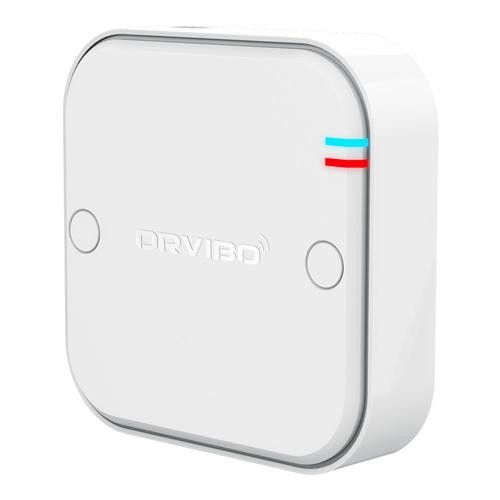
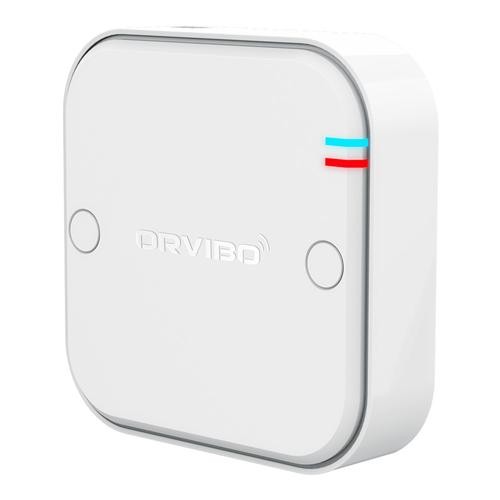
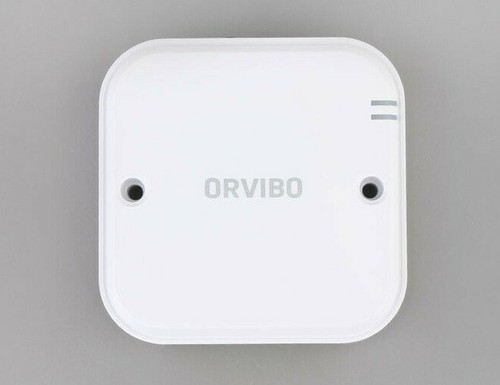
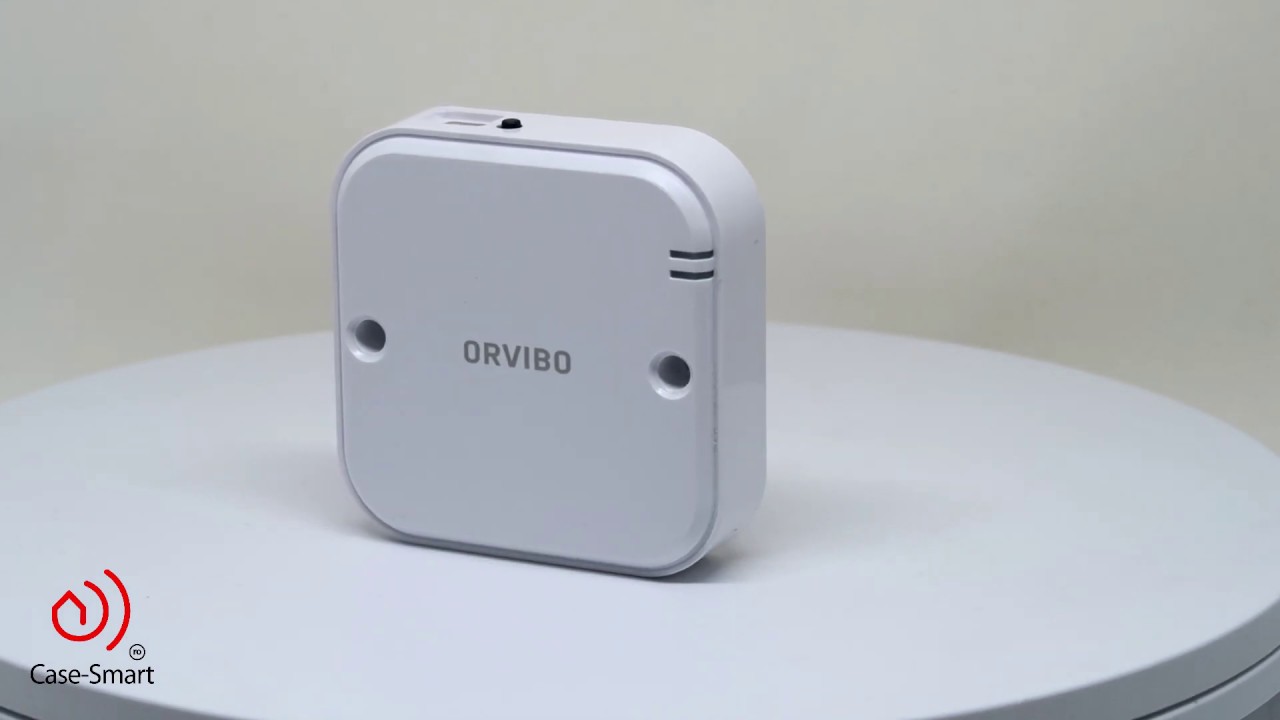
ZigBee Multi-Functional Relay

399.00 550.00 27.45

Hurry up! only 10 products left in stock!

Availability:
In stock
Quantity:
SKU:
SG-1110028

ZigBee Multi-Functional Relay in Dubai


Enhance​‍​‌‍​‍‌​‍​‌‍​‍‌ your home automation system by using the ZigBee Multi-Functional Relay, which you can get at SG Automations Dubai.

A single relay of this kind can connect to a variety of ZigBee gateways and can be used to control several electrical devices — for example, a lighting circuit or a curtain motor.

With the help of your mobile device or smart hub, you can enjoy wireless control, voice compatibility, and an energy-efficient mode of operation.

Whether it is a home, an office, or an industrial plant, the device is perfect for all kinds of setups and guarantees the implementation of simple, secure communication as well as a dependable smart control solution without the need for complicated ​‍​‌‍​‍‌​‍​‌‍​‍‌wiring.


Why Buy from SG Automations Dubai


SG​‍​‌‍​‍‌​‍​‌‍​‍‌ Automations is where you can find the best smart home automation system and ZigBee device integration services in Dubai and the UAE.

Our specialists are always ready to help you with the hardware installation, device configuration, and customer support that ​‍​‌‍​‍‌​‍​‌‍​‍‌follow.

Product Type normal
Sku SG-1110028
Product Code SG-1110027
Category Id 33
Alternate Product Name ZigBee Multi-Functional Relay
Brand Orvibo
Status 1

1Basic Product Information

AttributeDetails
Product NameZigBee Multi-Functional Relay
BrandORVIBO
ModelCM10ZW
Product TypeSmart ZigBee multi-functional relay module
CategorySmart Shading / Smart Home Automation
Primary FunctionConverts compatible motorized and electrical devices into remotely controllable smart devices
CommunicationZigBee wireless communication
AppORVIBO HomeMate App
Hub RequirementCommunicates with a compatible ZigBee hub for smart app control
InstallationWired electrical installation
Primary ApplicationsRailway curtains, electric windows, garage doors and garden irrigation devices

2Working Modes & Control

ModeDetails
High Voltage ModeDesigned for compatible high-voltage motor applications.
Low Voltage ModeDesigned for compatible low-voltage motor applications.
Power Relay ModeProvides general relay functionality for compatible electrical loads.
Mode SelectionThe operating mode is selected according to the connected device and wiring configuration.
Motor ControlSupports control of compatible motorized devices such as curtains, electric windows and garage doors.
Relay ControlCan operate as a general power relay in the supported relay mode.

3Supported Applications

ApplicationUse
Railway CurtainsProvides smart open and close control for compatible motorized railway curtains.
Electric WindowsCan control compatible electrically operated window motors.
Garage DoorsProvides smart control for compatible motorized garage door systems.
Garden IrrigationCan control compatible garden irrigation devices through the relay system.
Motorized ShadingCan be integrated into smart curtain and shading automation applications.
Smart Home ScenesCompatible devices can be included in smart scenes through the ORVIBO ecosystem.

4ZigBee Connectivity

AttributeSpecification
Wireless ProtocolZigBee HA
Wireless Frequency2.4GHz
Networking ModeZigBee automatic networking
PairingAutomatic networking technology reduces the need for manual code pairing.
Wireless Transmitting Power20dBm
Wireless Receiving Sensitivity<-90dBm
Working DistanceUp to 100m in open space under specified conditions
Mesh NetworkingSupported through ZigBee mesh communication.
Network StabilityMesh networking can extend communication through intermediate ZigBee devices.

5Electrical Specifications

AttributeSpecification
Power Supply100-240V AC
Input Frequency50-60Hz
Maximum Current1A per loop
Static Power Consumption<1W
Power SourceAC mains supply
Electrical ApplicationCompatible motor and relay control applications within the specified electrical ratings
Electrical safety: The CM10ZW is a mains-powered relay. Installation and wiring should be performed by a qualified electrician, with the power isolated before work begins. Always verify the connected load against the relay's published rating.

6Security & Encryption

FeatureDetails
EncryptionAES-128
Wireless SecurityZigBee communication uses AES-128 encryption.
Smart Home SecurityEncrypted wireless communication helps protect device control signals.
Automatic NetworkingAutomatic ZigBee networking simplifies integration with compatible hubs.
Power-Off MemoryThe relay remembers its configured operating state after power interruption, reducing the need to rejoin the ZigBee network.

7Power-Off Memory & Reliability

FeatureDetails
Power-Off MemorySupported
Network RecoveryThe relay does not need to access the ZigBee network again after a power interruption according to the manufacturer.
State RetentionConfigured power-off memory helps maintain the intended device state after power is restored.
Mesh NetworkingZigBee mesh networking supports communication through other compatible network devices.
Network ReliabilityMesh communication can help build a more stable ZigBee network over larger areas.

8Smart Home & HomeMate Integration

FeatureDetails
HomeMate AppSupported for smartphone control through a compatible ZigBee hub.
Remote ControlUsers can remotely control compatible connected devices through the smart home ecosystem.
ScenesSupports creation of smart automation scenes.
AutomationThe relay can participate in configured smart home automation routines.
ZigBee HubRequired as the communication bridge for HomeMate smartphone control.
Smart ShadingCan be used to add smart control to compatible curtain and window motors.

9Physical Specifications

AttributeSpecification
Dimensions70 × 70 × 23mm
Length70mm
Width70mm
Height23mm
Product FormCompact relay module
MountingSuitable for installation in an appropriate electrical enclosure or device installation location.

10Environmental Specifications

AttributeSpecification
Working Temperature-20°C to 60°C
Working Temperature FahrenheitApproximately -4°F to 140°F
Working Humidity≤80%
Operating EnvironmentUse in a suitable dry electrical installation environment within the specified temperature and humidity limits.
Outdoor InstallationThe relay should not be exposed directly to rain or moisture unless installed inside an appropriate weatherproof enclosure.

11Networking & Automation Features

FeatureBenefit
Automatic NetworkingUses ZigBee automatic networking technology for easier setup with compatible hubs.
Mesh NetworkingAllows ZigBee signals to be passed through intermediate network devices to extend network reach.
Smart ScenesAllows the relay to be included in automated smart home scenes.
Remote ControlCompatible devices can be controlled remotely through HomeMate.
Power-Off MemoryHelps retain the configured state after a power interruption.
Multiple ApplicationsOne relay platform supports different operating modes for compatible motor and relay applications.

12Smart Automation Examples

SceneExample Automation
Morning CurtainSchedule compatible motorized curtains to open automatically in the morning.
Movie ModeClose compatible curtains automatically as part of a movie or entertainment scene.
Away ModeInclude compatible motorized devices in an away or security automation scene.
Garage ControlUse compatible relay configuration to operate a motorized garage door.
Garden IrrigationControl compatible irrigation equipment through the relay and smart home automation system.
Electric WindowOperate compatible electric windows through supported smart controls.

13Installation & Wiring

Installation PointRecommendation
Power IsolationTurn off the main power supply or relevant circuit breaker before wiring the relay.
Operating ModeSelect the appropriate high-voltage, low-voltage or power-relay mode according to the connected device.
DIP SwitchSet the appropriate operating mode before connecting power and wiring.
WiringFollow the wiring diagram and terminal markings supplied with the relay.
Motor ConnectionConnect compatible motor terminals according to the selected motor mode.
Relay ConnectionUse the relay terminals according to the connected electrical load and selected relay mode.
ZigBee HubEnsure a compatible ZigBee hub is powered and available for smart app integration.
EnclosureInstall the relay in an appropriate protected electrical enclosure where required.

14Setup Instructions

  1. Switch off power:Turn off the relevant circuit breaker and confirm that the electrical circuit is de-energized.
  2. Identify the connected device:Determine whether the relay will control a compatible curtain motor, electric window, garage door, irrigation device or another supported electrical load.
  3. Select the operating mode:Choose high-voltage mode, low-voltage mode or power-relay mode according to the connected equipment.
  4. Configure the DIP switch:Set the appropriate DIP switch according to the required operating mode before applying power.
  5. Connect the wiring:Follow the wiring diagram printed on the device and connect the relevant live, neutral, common, open, close and stop terminals as applicable.
  6. Check the wiring:Verify every terminal and connection before restoring power.
  7. Restore power:Turn the circuit back on after confirming that the installation is secure.
  8. Prepare the ZigBee hub:Power on a compatible ORVIBO ZigBee hub and make sure it is ready for device pairing.
  9. Open HomeMate:Open the HomeMate App on a compatible smartphone and sign in or create an account.
  10. Add the relay:Use the app's device-add function to add the ZigBee multi-functional relay to the smart home system.
  11. Allow automatic networking:Allow the ZigBee device to join the compatible network using the automatic networking process.
  12. Test local operation:Check that the connected motor or electrical device responds correctly.
  13. Test remote operation:Use HomeMate to confirm that the connected device can be controlled through the smart home system.
  14. Create scenes:Configure schedules, scenes or automation routines according to the user's requirements.
  15. Check power recovery:Test the configured power-off memory behavior if required.
Important: Do not change wiring or DIP switch settings while the relay is energized. Incorrect wiring or incorrect mode selection may damage the relay or connected equipment.

15Wiring & Terminal Information

Terminal / FunctionDetails
LLive / phase connection where applicable.
NNeutral connection where applicable.
COMCommon terminal used in supported motor wiring configurations.
OPENOpen control terminal for compatible motor applications.
CLOSEClose control terminal for compatible motor applications.
STOPStop control terminal for compatible motor applications.
Relay TerminalsTerminals are used according to the selected general relay configuration and connected load.
Wiring DiagramAlways follow the wiring diagram printed on the actual device and the current product documentation.

16What's Included

ItemQuantity / Details
Multi-Functional Relay1 × ZigBee Multi-Functional Relay
Screws2 × Screws
Screw Caps2 × Screw Caps
Wires2 × Wires
User Guide1 × User Guide

17Key Features & Advantages

FeatureBenefit
Three Working ModesProvides high-voltage, low-voltage and power-relay operating modes for different compatible applications.
ZigBee HAProvides wireless smart home communication through the ZigBee ecosystem.
Automatic NetworkingSimplifies connection to a compatible ZigBee network.
HomeMate AppAllows compatible devices to be controlled from a smartphone through the ZigBee hub.
Smart ScenesAllows the relay to participate in automated smart home routines.
Power-Off MemoryHelps preserve the configured state after a power interruption.
Mesh NetworkingHelps extend ZigBee communication and improve network reliability.
AES-128 EncryptionProvides encrypted ZigBee communication.
100m Open-Space RangeProvides up to approximately 100m communication distance in open-space conditions.
Compact DesignThe 70 × 70 × 23mm housing allows flexible installation in suitable electrical locations.
Multiple ApplicationsCan be used with compatible curtains, electric windows, garage doors and irrigation devices.
Low Standby ConsumptionStatic power consumption is specified at less than 1W.

18Important Product Notes

PointInformation
Model IdentificationThe current official ORVIBO product page identifies the CM10ZW as the ZigBee Multi-Functional Relay.
ApplicationThe manufacturer describes the relay for railway curtains, electric windows, garage doors and garden irrigation devices.
Working ModesThree modes are specified: high voltage mode, low voltage mode and power relay mode.
Power Supply100-240V AC, 50-60Hz.
Maximum Current1A per loop according to the current CM10ZW specification.
Wireless Frequency2.4GHz.
Wireless ProtocolZigBee HA.
Transmission Power20dBm.
Receiving Sensitivity<-90dBm.
Communication DistanceUp to 100m in open space under specified conditions.
EncryptionAES-128 encryption.
Static Power ConsumptionLess than 1W.
Temperature-20°C to 60°C.
Humidity≤80% working humidity.
Power-Off MemorySupported.
Smart ScenesSupported.
HomeMateSmartphone control is available through a compatible ZigBee hub and HomeMate ecosystem.
Electrical InstallationProfessional electrical installation is recommended because the product uses mains voltage.
CompatibilityConnected motors and loads must remain within the relay's published electrical ratings and operating requirements.
Product Specification ChangesORVIBO states that specifications, appearance, software and components can change between production batches and product versions.
Specification note: ORVIBO's current official CM10ZW page specifies 1A per loop, 100m open-space range and 70 × 70 × 23mm dimensions. Some older or alternative ORVIBO documentation references different relay models and specifications. The CM10ZW specifications above should therefore be used for this product unless the physical product label identifies another model.

19Model & Specification Clarification

ReferenceDetails
Current CM10ZW70 × 70 × 23mm, 100-240V AC, 1A per loop, 2.4GHz, 20dBm, <1W static consumption, 100m open-space distance.
Older / Other ModelORVIBO also has documentation for model RL804QZB with different specifications, including 5A maximum load current.
Why This MattersDifferent ORVIBO relay models can have different electrical ratings and dimensions. Do not use another model's specifications for a CM10ZW installation.
Recommended VerificationCheck the model number printed on the relay before installation and match the wiring and load rating to the applicable product documentation.

?Frequently Asked Questions

What is the ZigBee Multi-Functional Relay?

The ORVIBO ZigBee Multi-Functional Relay is a smart relay module designed to control compatible motorized and electrical devices through ZigBee and the HomeMate smart home ecosystem.

What is the model number?

The current official ORVIBO product page identifies the model as CM10ZW.

What devices can the relay control?

The manufacturer lists railway curtains, electric windows, garage doors and garden irrigation devices as supported application examples.

Does the relay support curtains?

Yes. It is designed to control compatible motorized railway curtain systems and can be integrated into smart shading automation.

Can it control electric windows?

Yes. Compatible electric window motors can be controlled using the appropriate relay operating mode and wiring.

Can it control a garage door?

Yes. The manufacturer lists compatible garage door motors as an application for the multi-functional relay.

Can it control garden irrigation?

Yes. Garden irrigation devices are listed among the supported applications.

How many working modes does it have?

The CM10ZW has three specified working modes: high voltage mode, low voltage mode and power relay mode.

Does it use ZigBee?

Yes. The relay uses ZigBee HA wireless communication at 2.4GHz.

Does it need a ZigBee hub?

Yes, a compatible ZigBee hub is required for communication with the HomeMate smart home app and remote smartphone control.

Can I control the relay from my phone?

Yes. When connected to a compatible ZigBee hub, the relay can receive control commands through the HomeMate App.

Does it support smart scenes?

Yes. The manufacturer specifies support for creating smart scenes.

Does it support automatic ZigBee networking?

Yes. ZigBee automatic networking is supported, reducing the need for manual code pairing.

Does it support ZigBee mesh networking?

Yes. The relay can participate in ZigBee mesh networking, allowing communication to pass through intermediate ZigBee devices.

What is the ZigBee range?

The current CM10ZW specification lists a working distance of up to 100m in open space under specified conditions.

What is the power supply?

The CM10ZW uses a 100-240V AC power supply at 50-60Hz.

What is the maximum current?

The current official specification lists a maximum current of 1A per loop.

How much power does it consume?

Static power consumption is specified as less than 1W.

What is the size of the relay?

The CM10ZW measures approximately 70 × 70 × 23mm.

What is the operating temperature?

The specified working temperature is -20°C to 60°C.

What humidity range does it support?

The specified working humidity is 80% or less.

Does it support AES encryption?

Yes. The product specification lists AES-128 encryption for ZigBee communication.

Does it have power-off memory?

Yes. Power-off memory is supported, allowing the relay to retain its configured operating behavior after a power interruption.

What happens if power is interrupted?

The manufacturer states that the power-off memory function means the relay does not need to access the ZigBee network again after power is restored.

Is the relay suitable for smart home automation?

Yes. It can be integrated into ZigBee smart home scenes and controlled through the HomeMate ecosystem when connected to a compatible ZigBee hub.

Can it be used for smart curtain automation in Dubai?

Yes. It can be used for compatible motorized curtain systems in Dubai, provided the motor and electrical installation meet the relay's specifications.

Is professional installation recommended?

Yes. Because the CM10ZW is a mains-powered electrical relay, professional installation is recommended, particularly where high-voltage wiring is involved.

Can the relay be installed outdoors?

The relay is not specified as an outdoor weatherproof device. If used for an outdoor application such as irrigation, it should be installed in a suitable protected electrical enclosure.

What is included in the package?

The published package includes one multi-functional relay, two screws, two screw caps, two wires and one user guide.

Is the relay the same as every ORVIBO multi-functional relay?

No. ORVIBO has multiple relay models with different electrical ratings and specifications. The CM10ZW should be identified by its model number before installation.

Why do some specifications online show 5A?

Some older or different ORVIBO relay models, such as RL804QZB, have different published specifications including a 5A maximum load. The current CM10ZW specification lists 1A per loop.

What should I check before buying?

Confirm the relay model, connected motor or load type, operating mode, voltage, current rating, wiring configuration and ZigBee hub compatibility before purchase and installation.

Customer reviews

0 Reviews Write a review

Write a review

No reviews yet.

Cart

Your cart is currently empty

Continue shopping