0 Reviews

Super Smart Switch

50.00 100.00 50
Availability:
Out of stock
Quantity:
SKU:
SG-111006

Super Smart Switch in Dubai

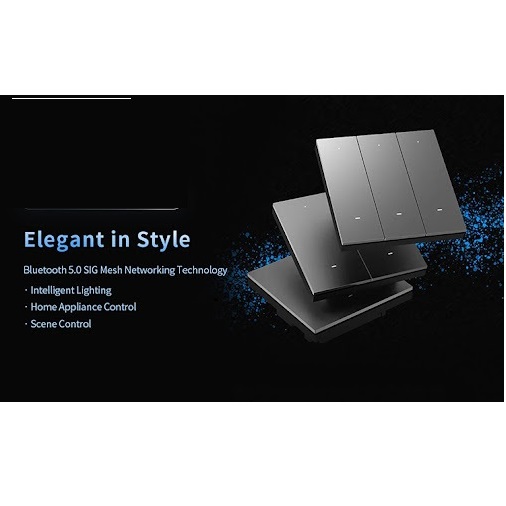
Make​‍​‌‍​‍‌​‍​‌‍​‍‌ your lighting more stunning and efficient by the help of the Super Smart Switch from SG Automations Dubai - a beautiful, clever wall switch made for trendy smart homes in the UAE.

By using this Wi-Fi-equipped switch, you can operate your lights at any location, program them, and also make automation scenes by using your mobile phone or voice assistants such as Alexa and Google Home.

The Super Smart Switch, which is made to be safe, energy-efficient, and comfortable, will increase your everyday well-being and will be a perfect match for any ​‍​‌‍​‍‌​‍​‌‍​‍‌interior.

Why Choose SG Automations Dubai

We​‍​‌‍​‍‌​‍​‌‍​‍‌ at SG Automations have expertise in implementing smart home automation systems that are applicable not only in Dubai but also in the entire Gulf area.

One of our main features of the Super Smart Switches is their installation which can be done without any trouble, and they are very dependable and complete smart integration is possible for a lifestyle that is connected and that you will definitely ​‍​‌‍​‍‌​‍​‌‍​‍‌like.

Product Type normal
Sku SG-111006
Product Code SG-111006
Category Id 30
Alternate Product Name Super Smart Switch
Brand Orvibo
Status 1

1Basic Product Information

Attribute Detail
Product Name Super Smart Switch
Product Series ORVIBO MixSwitch
Product Category Smart Switches
Switch Type Smart wall switch with Zigbee connectivity
Communication Protocol Zigbee 3.0
Available Configurations 1-Gang, 2-Gang, 3-Gang and 4-Gang configurations, depending on the selected model
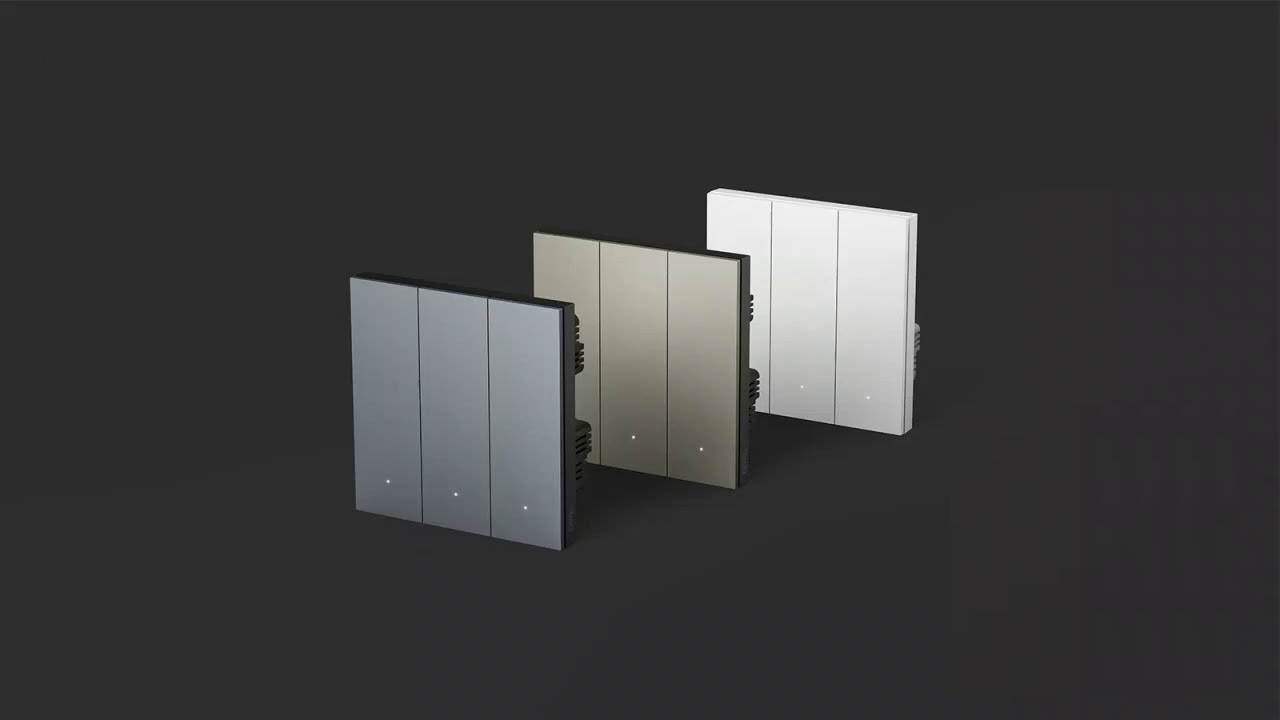
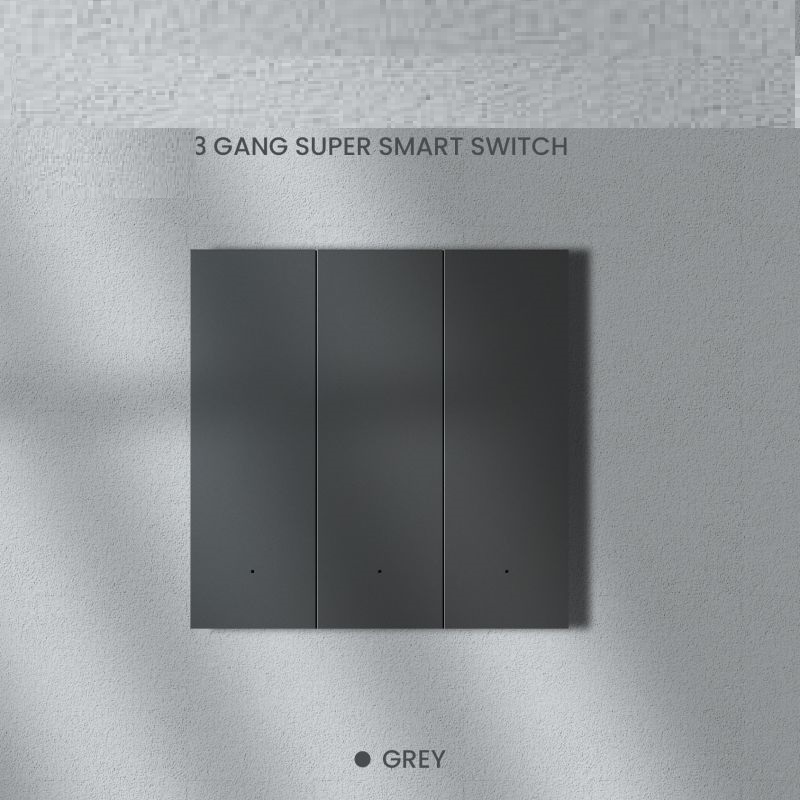
Available Colours White, Grey and Golden
Application Smart lighting control and connected-home scene management
Installation Style Wall-mounted in-wall switch
Location Dubai, UAE
SG Automations Category Smart Switches

2Model & Configuration Options

Configuration Model Options Size
1-Gang T40W1Z Grey / T40W1ZG Golden / T40W1ZW White 86 × 86 × 40 mm
2-Gang T40W2Z Grey / T40W2ZG Golden / T40W2ZW White 86 × 86 × 40 mm
3-Gang T40W3Z Grey / T40W3ZG Golden / T40W3ZW White 86 × 86 × 40 mm
4-Gang T40W4Z Grey / T40W4ZG Golden / T40W4ZW White 86 × 86 × 40 mm
Battery Remote Version T40S6Z Grey / T40S6ZG Golden / T40S6ZW White 86 × 86 × 10 mm

3Technical Specifications

Specification Detail
Product Size 86 × 86 × 40 mm for the wired MixSwitch versions
Battery Remote Size 86 × 86 × 10 mm
Power Supply Live wire and Neutral wire for wired versions
Input Voltage 220V~, 50/60Hz for the specified MixSwitch versions
Wireless Protocol Zigbee
Wireless Standard Zigbee 3.0
Wireless Communication Distance Up to 80 metres under specified conditions
Load Range Up to 200W per loop for the listed MixSwitch technical specification
Operating Temperature -20°C to 60°C
Working Humidity ≤85% RH

4Multi-Gang Switching

Variant Control Capacity Typical Use
1-Gang Single lighting circuit Bedroom, corridor, small room or single lighting zone
2-Gang Two lighting circuits Bedroom plus accent light, or two independent lighting zones
3-Gang Three lighting circuits Living room, dining area and decorative lighting combinations
4-Gang Four lighting circuits Multiple lighting zones from one wall location
The exact electrical load must always be checked against the specific model and the connected lighting load before installation.

5Design & Appearance

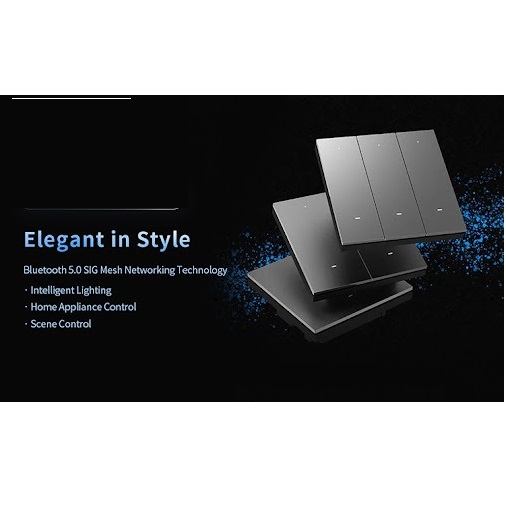
Design Approach Designed to make the wall switch part of the interior rather than treating it as a basic electrical accessory.
Available Colours White, Grey and Golden
Wall Appearance Clean, modern styling suitable for contemporary residential interiors.
0.1mm Frame A precision installation frame is available for compatible MixSwitch and MixPad Mini installations.
Interior Matching The three colour options allow the switch to be matched with different wall finishes and interior styles.
Installation Format Designed around the standard 86 mm wall-switch format for compatible installations.

6MixCtrl™ Smart Control

Feature How It Works
MixCtrl™ Technology Allows switch functions to be combined and assigned according to the user's preferred smart-home setup.
Scene Control Buttons can be used to trigger smart scenes rather than being limited to basic light switching.
Multi-Device Control A configured button can interact with multiple compatible smart devices or actions.
One-Key Operation A single button action can be configured to activate a wider smart-home routine.
Custom Functions Control assignments can be arranged around household routines and preferred usage patterns.
Scene Panel The switch can work as both a conventional lighting control and a smart scene control point.

7Smart Home Functions

Zigbee 3.0 Smart Scenes Multi-Device Control Remote Control Voice Integration Lighting Control Scene Panel
Lighting Control Provides physical control of connected lighting circuits.
Smart Scenes Compatible buttons can trigger pre-configured smart-home scenes.
Remote Control When connected to the appropriate smart-home gateway, supported functions can be managed remotely.
Voice Control Compatible smart-home configurations can connect lighting scenes with supported voice assistants.
Automation The switch can become part of broader automated routines involving lights and other connected devices.
Group Control Compatible smart devices can be combined into a single scene or routine.

8Zigbee 3.0 Connectivity

Protocol Zigbee 3.0
Network Type Low-power wireless smart-home communication
Communication Distance Up to 80 metres under the specified technical conditions
Response Designed for quick communication between compatible smart-home devices.
Multi-Device Environment Zigbee is suitable for smart-home installations where multiple connected devices need to communicate.
Gateway Requirement Smart scene, app and wider automation functions require a compatible Zigbee smart-home gateway or controller.
Network Stability Zigbee mesh networking can provide reliable communication across compatible smart-home devices when correctly deployed.

9Smart Scene Examples

Scene Possible Action
Good Morning Turn on selected lights and activate other morning routines through compatible smart devices.
Movie Time Reduce selected lights and activate entertainment-related devices in one scene.
Dinner Turn on dining lights and adjust other connected lighting according to the configured scene.
Relax Switch selected lights to a softer setting and activate compatible ambient devices.
Good Night Turn off selected lights and trigger compatible security or smart-home actions.
Leaving Home Use one configured button to turn off lights and trigger other compatible away-mode actions.

10Moveable Remote Control Switch

Type Battery-powered smart remote control panel
Battery CR2032
Size 86 × 86 × 10 mm
Buttons Six customizable buttons
Placement Can be positioned on a bedside table, coffee table, desktop or wall according to the installation arrangement.
Wiring Battery powered, allowing flexible placement without a wired electrical connection.
Battery Life More than one year under the specified normal temperature and humidity conditions.
Scene Function Buttons can be assigned to smart devices and scene modes.

11RelayPro-Tech™ Protection

Technology RelayPro-Tech™
Surge Test The product information specifies a 2000V lightning surge test for relay protection.
Switching Durability ORVIBO states that the relay switching count exceeds 60,000 operations on the referenced product information.
Structural Design Fully isolated structural design is used as part of the product's electrical protection approach.
Fire Protection The product information specifies fire-protection performance up to UL94V-0.
Material Fire-resistant PC material is used in the product construction.
Safety Certification The product information references national CQC safety certification.
Laboratory and internal test figures are reference values. Real-world service life and performance can vary with electrical conditions, installation quality, operating frequency and environment.

12Installation & Setup Instructions

This is a mains-powered wall switch. Electrical installation should be completed by a qualified electrician and must follow local electrical requirements.
  1. Choose the correct model: Select the 1-Gang, 2-Gang, 3-Gang or 4-Gang version according to the number of circuits you need to control.
  2. Confirm the wiring: Check that the installation location has the required live and neutral wiring for the selected wired model.
  3. Check the wall box: Confirm that the existing wall box is compatible with the 86 mm switch format and has sufficient installation depth.
  4. Turn off power: Isolate the electrical supply before removing an existing wall switch.
  5. Connect the switch: Complete the live, neutral and load connections according to the model's wiring diagram.
  6. Secure the switch: Fix the switch firmly into the wall box and ensure the faceplate is correctly aligned.
  7. Restore power: Turn the electrical supply back on after confirming that the wiring is secure.
  8. Test manual control: Check each physical button and confirm that the connected lighting circuit responds correctly.
  9. Prepare the Zigbee network: Ensure that a compatible Zigbee gateway or smart-home controller is available for smart functions.
  10. Pair the switch: Add the switch to the compatible smart-home system following the controller's pairing procedure.
  11. Assign functions: Configure buttons according to the lighting requirements and preferred smart scenes.
  12. Create automation: Link the switch with compatible devices and routines where required.
  13. Test the complete setup: Test physical switching, app control and configured scenes before completing the installation.

13Installation Requirements

Requirement Guidance
Wall Box A compatible 86 mm wall box should be used for the wired MixSwitch installation.
Wiring Live and neutral wiring is required for the specified wired versions.
Installation Depth Adequate wall-box depth should be available to accommodate the switch and wiring safely.
Circuit Planning The number of electrical loops should match the selected gang configuration.
Gateway A compatible Zigbee gateway is needed for smart-home scenes and connected-device control.
Electrical Safety Power must be isolated before electrical work is carried out.
Professional Installation Qualified electrical installation is recommended for mains-powered switch replacement or new wiring.

14Recommended Applications

Area Recommended Use
Living Room Control main lights, accent lighting and smart scenes from a central wall location.
Bedroom Control bedroom lighting and use configured buttons for evening or sleep scenes.
Dining Room Operate dining lights and connect the switch with dinner or relaxation scenes.
Villa Useful for multi-room lighting control where several smart switches and Zigbee devices are installed.
Apartment Provides a compact smart control point for lighting and automation routines.
Home Automation Can be integrated into a wider Zigbee smart-home network with compatible devices.
Smart Lighting Suitable for homes that want physical switch control together with app and scene-based automation.

15Key Benefits

Smart & Physical Control Combines familiar wall-switch operation with smart-home functionality.
Scene Automation Buttons can be configured to activate wider smart-home scenes.
Multi-Device Operation Compatible configurations can control more than one smart device through a programmed action.
Zigbee 3.0 Uses Zigbee 3.0 for communication with compatible smart-home devices.
Multiple Gang Options Available in different gang configurations for different lighting requirements.
Three Colour Choices White, Grey and Golden finishes provide options for different interiors.
Flexible Remote Option The battery-powered remote version provides six customizable buttons and flexible placement.
Modern Appearance The switch is designed to complement contemporary home interiors.

16Safety & Usage Notes

Electrical Safety Always isolate mains power before installation, replacement or servicing.
Qualified Installer Mains electrical work should be carried out by a suitably qualified electrician.
Load Verification Verify the connected lighting load against the exact model's rated load before installation.
Correct Wiring Incorrect wiring can damage the product or create an electrical hazard.
Moisture Do not install the standard indoor switch in locations exposed to water unless the exact model is specifically rated for that environment.
Smart Gateway Smart scenes and connected-device functions depend on a compatible Zigbee gateway or controller.
Network Range Actual wireless range can be affected by walls, metal structures, interference and the overall Zigbee network design.

17Care & Maintenance

Cleaning Switch off the electrical supply before cleaning the surface and use a soft, dry or slightly damp cloth.
Avoid Abrasives Do not use abrasive pads or harsh chemicals that may damage the switch surface.
Check Operation Periodically confirm that physical buttons and connected lighting circuits respond normally.
Smart Network If smart functions stop responding, check the Zigbee gateway and network status before removing the switch.
Loose Connections Electrical connections should only be inspected or serviced by a qualified professional.

?Frequently Asked Questions

What is the Super Smart Switch?

The Super Smart Switch is a Zigbee-enabled smart wall switch designed to provide physical lighting control together with smart scenes and connected-device functions.

What protocol does the Super Smart Switch use?

The MixSwitch range uses Zigbee, with the product platform supporting Zigbee 3.0 communication.

How many gang options are available?

The range includes 1-Gang, 2-Gang, 3-Gang and 4-Gang wired configurations, depending on the model.

What colours are available?

The wired MixSwitch versions are available in White, Grey and Golden options.

Does the switch require a neutral wire?

The specified wired MixSwitch versions use live and neutral wiring. Installation requirements should be checked against the exact model before purchase.

What is the size of the Super Smart Switch?

The specified wired MixSwitch models measure 86 × 86 × 40 mm.

What is the wireless communication range?

The technical specification lists a wireless communication distance of up to 80 metres under specified conditions.

Can the switch control smart scenes?

Yes. MixCtrl™ allows compatible buttons to be assigned to smart scenes and other connected-device functions.

Can one button control multiple smart devices?

Compatible smart-home configurations can use a button to trigger multiple devices or actions as part of a configured scene.

Can the Super Smart Switch work with a Zigbee gateway?

Yes. A compatible Zigbee gateway or controller is used for smart-home networking, scene management and connected-device functions.

Is there a battery-powered version?

Yes. The MixSwitch range includes a battery-powered remote version using a CR2032 battery.

How many buttons does the remote version have?

The moveable remote control version provides six customizable buttons.

Where can the remote switch be placed?

Depending on the installation arrangement, it can be used beside a bed, on a coffee table, desk or wall.

What is MixCtrl™?

MixCtrl™ is ORVIBO's interactive control technology that allows switch buttons to be assigned to different smart devices and scene functions.

Is the Super Smart Switch suitable for smart homes in Dubai?

Yes. It can be used as part of a compatible Zigbee-based smart-home and lighting installation in Dubai, subject to correct electrical installation and system compatibility.

Does it support voice control?

Voice control can be available through compatible smart-home integrations and voice assistants when the switch is connected to the appropriate system.

Can it be used for villa automation?

Yes. Its Zigbee connectivity and scene functions make it suitable for multi-room lighting and smart-home automation when combined with compatible devices and a Zigbee gateway.

Does the switch need professional installation?

Because the wired versions connect to mains electricity, professional installation by a qualified electrician is recommended.

Customer reviews

0 Reviews Write a review

Write a review

No reviews yet.

Cart

Your cart is currently empty

Continue shopping